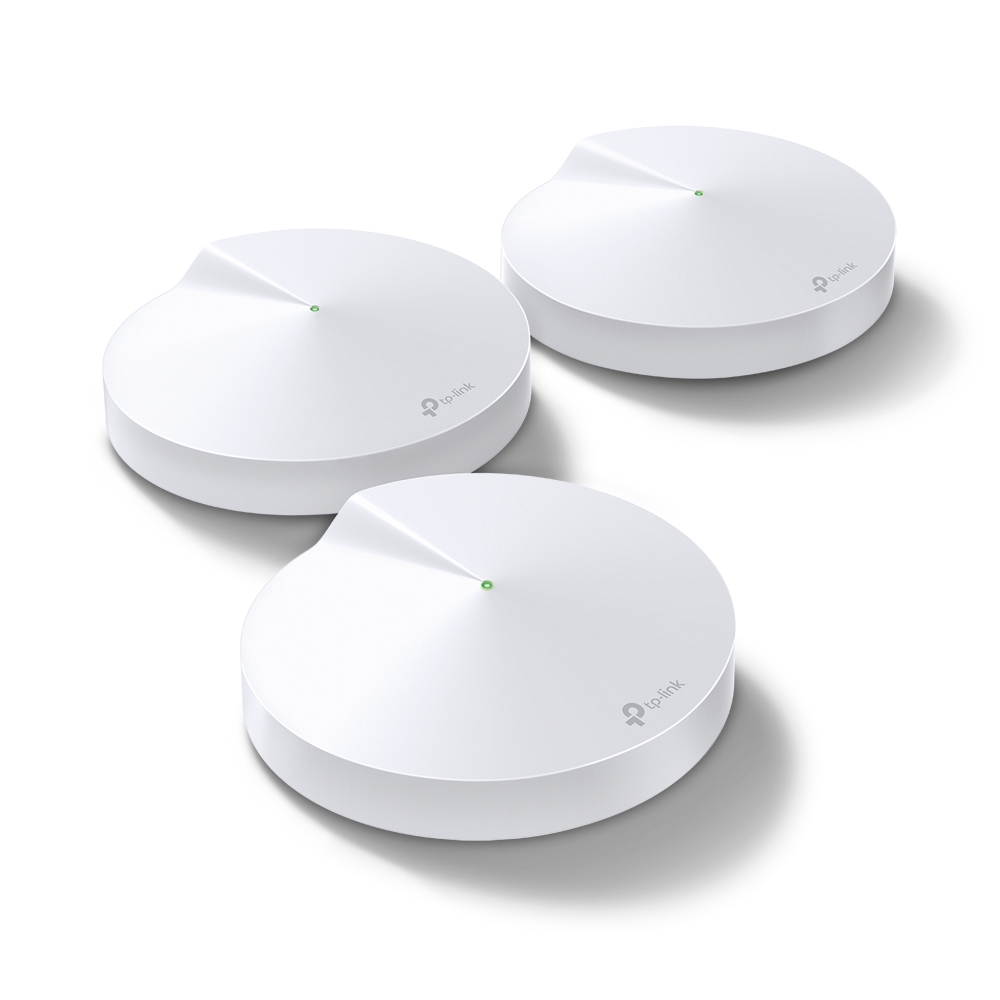
Ever feel like your Wi-Fi signal mysteriously vanishes in certain rooms of your house? Enter the TP-Link Deco M5 Mesh Wi-Fi System, a revolutionary way to achieve blanket Wi-Fi coverage throughout your entire home. But before we dive into why the Deco M5 is a game-changer, let's break down exactly what mesh Wi-Fi is and why it matters.
What is Mesh Wi-Fi?
Traditional routers blast a single Wi-Fi signal from a central location. This works well in smaller spaces, but in larger homes with thick walls or multiple floors, the signal weakens significantly, creating frustrating dead zones. Mesh Wi-Fi takes a different approach. It utilizes multiple units (typically two or three) that work together to create a unified Wi-Fi network throughout your entire home. Imagine each Deco unit as a beacon, seamlessly passing the signal to each other, extending a common network name. Signal strength and handoff behaviour still depend on unit placement, backhaul and the client.
Why is Mesh Wi-Fi Important?
Our homes are filled with internet-hungry devices – laptops, smartphones, tablets, smart TVs, game consoles – and the list keeps growing. A weak or spotty Wi-Fi signal can disrupt streaming, online gaming, video calls, and more. Mesh Wi-Fi aims to reduce those weak areas by adding suitably placed access points. It cannot guarantee the same speed in every room or eliminate lag caused by the ISP, a busy network or the application itself.
Deco M5: Specs and Features
- Dual-Band Wi-Fi AC1300: Up to
867 Mbpson the 5 GHz band (802.11ac 2×2) and400 Mbpson the 2.4 GHz band (manufacturer-advertised maximum; compatible client capabilities are required) - Manufacturer coverage estimate: up to 5,500 sq ft for the cited US three-pack; layout and region matter
- Manufacturer capacity claim: over 100 connected devices under its test conditions; not 100 guaranteed simultaneous high-bandwidth sessions
- HomeCare and later supported firmware provide network security, parental controls and QoS; inspect the current service/feature boundaries described below
- Easy setup with the Deco app
Who is the Deco M5 Perfect For?
- Larger Homes: If your home suffers from Wi-Fi dead zones, the Deco M5 is worth considering for extending the network, subject to the floor plan and suitable backhaul.
- Gamers: Online gamers demand a lag-free connection. Test latency during normal household traffic; a wired connection to a suitable unit can be useful, but the wireless backhaul still matters.
- Smart Home Enthusiasts: With the ever-growing number of smart home devices, check each device’s connection and any radio/roaming compatibility before relying on the whole setup.
Pros of the Deco M5
- Designed to extend coverage to weak areas
- Easy setup process
- Strong parental controls and security features
- Scalable – add more Deco units for even greater coverage
Cons of the Deco M5
- May be overkill for small homes
- Uses Wi-Fi 5 (802.11ac Wave 2 with 2×2 MU-MIMO) rather than newer Wi-Fi 6 (802.11ax) or dedicated tri-band wireless backhaul
The Deco M5 is the perfect solution for those who crave a whole-home Wi-Fi experience. With its easy setup, strong performance, and comprehensive security features, the Deco M5 is an appealing option in this article’s assessment. The practical checks below help establish whether it suits your particular home.
The hardware and its limits
The official M5 specification lists a 120×120×38 mm enclosure, four internal antennas and two auto-sensing Gigabit Ethernet ports per unit. AC1300 describes the rounded sum of 867 Mbps on 5 GHz and 400 Mbps on 2.4 GHz, rather than the speed of one download. It remains a dual-band Wi-Fi 5 product, not a 6 GHz or Wi-Fi 6/7 system.
MU-MIMO is supported for compatible clients; the original no-MU-MIMO description was incorrect. It is not a promise that every device can share the advertised maximum simultaneously. Also check the hardware revision and regional firmware before assuming a particular internal processor, encryption option or feature exists. An undocumented chip name is not a useful basis for a whole-home performance guarantee.
| Specification | Planning implication |
|---|---|
| Two Gigabit ports per unit | An upstream or backhaul connection occupies a port; add a suitable switch for more wired devices |
| Dual-band wireless | Wireless clients and backhaul share radio resources |
| Compact enclosure | Easy to place on a shelf, with ventilation and cable clearance still needed |
| Advertised coverage/capacity figures | Starting estimates that need testing in the actual home |
Compared with the similarly rated M4 and E4, pay attention to ports and required features rather than shape alone. An E4 main unit's Fast Ethernet uplink is a concrete limit. The M5's Gigabit ports avoid that particular limit, but do not prove a fixed wireless result at every satellite.
HomeCare and the newer service options
The US M5 page describes an included lifetime HomeCare subscription, while its terms allow service changes and tie “lifetime” to the purchased device. That should not be expanded into a guarantee that every future security or parental feature stays free or unchanged.
TP-Link's M5 1.9.0 announcement describes a newer basic/advanced parental-control service arrangement. It says the previously free capabilities remain available without a subscription, with paid advanced parental options. Its network security remains free. Verify the actual unit's firmware, main-router role and displayed options rather than treating the old HomeCare screens as universal.
Network protection includes malicious-content filtering, intrusion prevention and infected-device controls. TP-Link's quarantine description concerns preventing flagged devices from sending threats or sensitive information outside the network. Do not treat that as a proven guarantee that a compromised device is isolated from every LAN peer. Inspect the alert and affected traffic, and investigate the device rather than assuming it has been cleaned.
These are router services, not endpoint file scanning or a replacement for device updates, account protection and backups. Content filters may misclassify a site; review a legitimate blocked service using the supported process rather than disabling all protection indefinitely. Parental controls also need practical testing on the intended devices. QoS prioritises traffic under congestion; it does not add bandwidth to an internet plan.
Placement, backhaul and roaming
Place a wireless satellite where it can still communicate well with the mesh, then test the troublesome room. Avoid assuming that adding a puck directly inside a complete dead zone creates a good upstream path. The low enclosure does not establish an optimal wall/ceiling orientation for every bracket; maintain ventilation and follow the accessory's fitting guidance.
Ethernet backhaul can reduce competition for the shared wireless bands. In Router mode, put the switch and satellites downstream of the main Deco's LAN side; Access Point mode has different supported wiring choices. Follow the backhaul guide. Neither arrangement guarantees 500–600 Mbps Wi-Fi at every puck. Client radios, interference and channel conditions still influence the result.
Fast Roaming uses 802.11r and needs compatible clients. TP-Link documents connection problems with some unsupported clients. Enable it deliberately, check the phones and smart-home devices that matter, and try disabling it if a specific device fails. There is no universal sub-50-millisecond handoff established by the feature name. Test an actual moving call instead of counting the number of access points.
Expand according to the actual bottleneck
You can mix compatible Deco models, including the linked M9 Plus, X55 and BE65. The mixed-model guide explains main-unit and node capabilities. A newer main unit does not turn an M5 satellite into Wi-Fi 6/7 or add a third radio to it. Features can also depend on the selected main unit.
The original favourable view of coverage, easy setup and useful security controls remains, alongside its caution that a mesh kit may be excessive for a small home. Before replacing hardware, compare a wired test at the main unit, the same client near each satellite and the real application in the weak room. Record backhaul type and repeat under household load. Improve a poor link or a port constraint first, rather than assuming a particular ISP-plan number automatically requires a new whole-house kit.