Welcome to the future of home networking and smart home integration! The Deco Voice X20 is not just any Wi-Fi system; it’s a game-changer for both connectivity and home automation. Let’s dive into the features that make the Deco Voice X20 a must-have for any tech-savvy household.
Seamless Connectivity with Wi-Fi 6
The Deco Voice X20 uses Wi-Fi 6, with published rates of 1,201Mbps on 5GHz and 574Mbps on 2.4GHz. TP-Link advertises coverage up to 5,800 ft² and over 150 connected devices, subject to the kit, clients and conditions. These are manufacturer estimates, not a guarantee that every device can use maximum speed at once.
Smart Home Control with Built-In Amazon Alexa
Imagine controlling your smart home devices, getting weather updates, or playing your favorite tunes, all with simple voice commands. With Alexa built-in, the Deco Voice X20 transforms your living space into a responsive, intelligent environment.
Integrated Smart Speaker Audio Architecture
Not only does the Deco Voice X20 manage your internet and smart devices, but it also doubles as an integrated smart speaker. The built-in audio is part of the appeal: you can ask Alexa to play supported music or radio without adding a separate speaker beside that node. Available services depend on your Amazon account, region and any required subscription.
Robust Network Security with TP-Link HomeShield
Security is paramount, and the Deco Voice X20 has got you covered with TP-Link HomeShield. HomeShield offers parental-control and security functions, with a basic plan and paid features. Check the particular tier and operating mode for the controls you need. Router protection complements updated devices and safe account practices; it cannot promise that every threat is blocked.
Effortless Setup and App Management
Setting up the Deco Voice X20 is a breeze with the intuitive Deco app. Plus, managing your network is just as easy, whether you’re at home or on the go.
Acoustic Cylinder Design
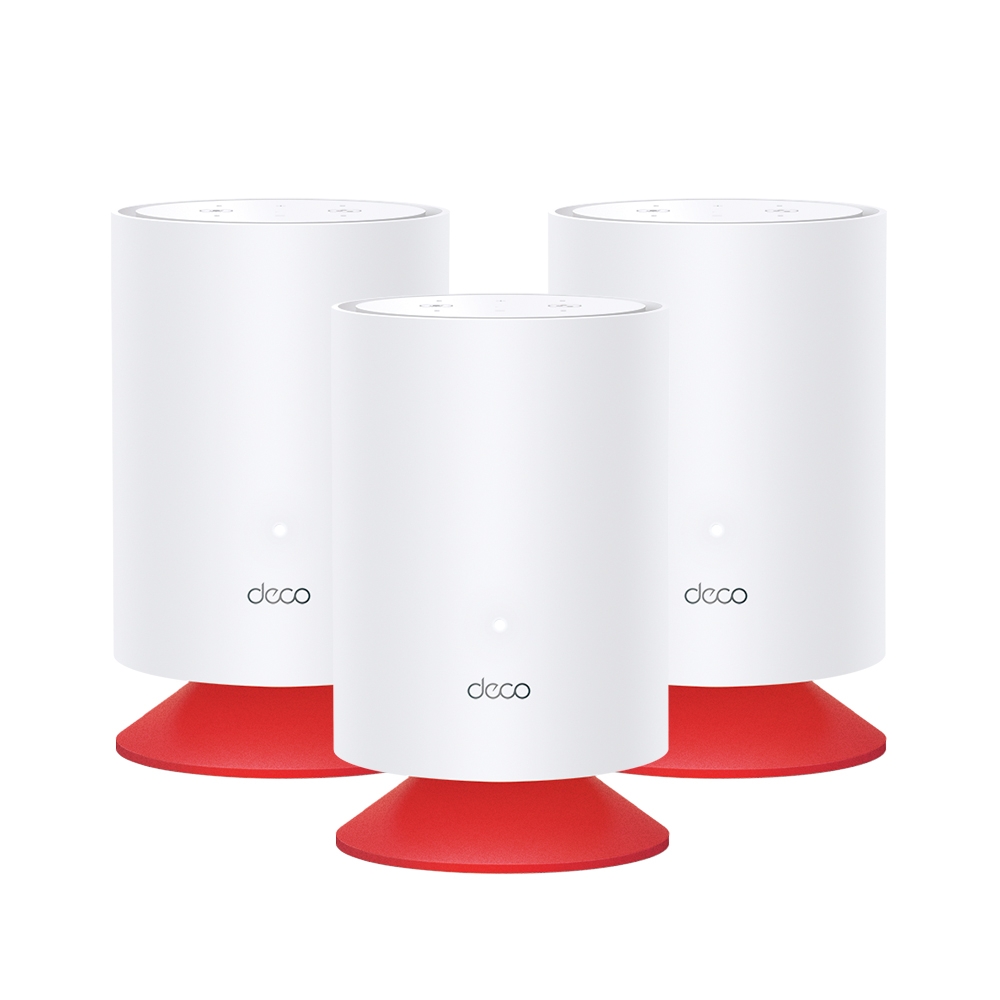
The Deco Voice X20 isn’t just smart; it’s also stylish. Its signature red base and simple cylinder design will add a touch of elegance to any room.
Deco Voice X20 Specifications
| Feature | Specification |
|---|---|
| Wi-Fi Technology | Wi-Fi 6 (AX1800) |
| Advertised coverage | Up to 5,800 ft² (540m²), subject to pack size and conditions; not per node |
| Device-count claim | Over 150 devices according to TP-Link; workload affects usable capacity |
| Band rates | 1,201Mbps at 5GHz + 574Mbps at 2.4GHz; AX1800 is an aggregate rating |
| Built-In Voice Assistant | Amazon Alexa |
| Ethernet Ports | 2× Gigabit WAN/LAN per unit |
| Security | TP-Link HomeShield |
| Audio hardware | 5W full-frequency speaker with double bass passive diaphragm |
| Mesh Compatibility | Works with all Deco models |
| Design | Signature red base with cylinder design |
Embrace the smarter, connected lifestyle with the Deco Voice X20. It’s more than just a Wi-Fi system; it’s the central hub for your smart home.
Conclusion
By combining an AX1800 Wi-Fi 6 Deco node and an Alexa-enabled smart speaker in one chassis, the Deco Voice X20 eliminates counter clutter in kitchens, bedrooms, and hallways while extending seamless Wi-Fi coverage. For official product details and firmware support, visit Deco Voice X20 | AX1800 Mesh Wi-Fi 6 System with Alexa Built-In | TP-Link.
Speaker and microphone hardware
The published specification lists a four-microphone array and a 5W full-frequency speaker with a double bass passive diaphragm. There are separate mute, action and volume buttons. These details describe the hardware; they do not establish a measured sound-pressure level, listening quality against another speaker or reliable wake-word pickup in every noisy room.
TP-Link states that the mute button stops sound acquisition. Use it when you do not want voice input and check the unit's indicated state. The router radios are a separate function, so test that your local network still works as expected. The public specification does not justify the stronger claim that a particular electrical microphone-disconnect circuit has been verified.
Alexa-related functions and voice services are provided by Amazon, and the product page directs readers to Amazon's privacy policy. Review the linked account's privacy and voice-history settings as well as the physical mute control. TP-Link's statement that it does not collect voice information does not mean that enabling Alexa involves no other service provider.
Link Alexa separately from Wi-Fi setup
First add the Voice X20 to your Deco network using the Deco app and confirm that the internet and local Wi-Fi work. Adding a mesh node and enabling its voice service are separate tasks. The main Deco still needs an Ethernet connection to the internet source, and each node needs its compatible power supply.
TP-Link's voice-service instructions use More > Alexa Voice Service > Enable Alexa, followed by signing in to an Amazon account. Follow the actual app prompts and give the device an identifiable name. Alexa's cloud functions also depend on a working internet connection; do not assume the built-in assistant is a local, offline smart-home controller.
For supported network commands, enable the TP-Link Router Skill and complete Link with Alexa. Select the intended networking product if the TP-Link account contains more than one. The manufacturer's guide notes that one product is selected for skill control at a time.
Its documented examples include “Alexa, turn on guest Wi-Fi” and “Alexa, turn off Deco's LED light”. Test a harmless supported command and confirm the result in the Deco app. Do not infer that every parental-control action, family profile or smart device can be controlled by an arbitrary phrase.
Combined node or separate speaker?
The attraction is combining two useful functions at one powered location. That can reduce clutter, and the red base and cylindrical design remain part of its appeal. A separate speaker offers a different advantage: its best listening position need not be the best mesh-node location, and its service or hardware can be replaced independently.
Standard Deco X20 and Deco Voice X20 are distinct products. A standard X20 does not gain microphones merely by linking an Alexa skill. The Voice X20 can also join a network with other supported Deco models, including a Deco X55 or Deco BE65. The main model influences app features; each satellite keeps its own radio and port limits.
Check specific Alexa capabilities rather than treating the Voice X20 as interchangeable with every Echo model. Calling, messaging and announcements can depend on firmware, and TP-Link notes that some early shipments required updates for those functions. Confirm music-service and group-playback compatibility in the actual app before buying specifically for multi-room audio.
Placement, backhaul and useful checks
Use an open shelf or suitable surface where speech reaches the microphones and the speaker is not obstructed. Also check the mesh link: placing the unit inside a Wi-Fi dead zone cannot create a strong upstream connection. There is no universally correct three-to-five-foot mounting height that guarantees both radio and acoustic performance.
The Voice X20 is dual-band. Wireless backhaul shares radio resources with clients, while supported Ethernet backhaul can carry the node-to-node traffic over a cable. Each unit has two Gigabit auto-sensing ports; an internet uplink or backhaul connection uses one. In Router mode, wire satellites downstream of the main Deco's LAN side. In AP mode, the existing router provides routing and the wired topology is different.
Check the feature consequences before choosing AP mode. TP-Link's mode comparison shows that routing-dependent Deco functions such as its parental controls and QoS are unavailable there, even though Wi-Fi coverage remains. Plan whether the upstream router or another service provides the household controls you need.
- Verify an ordinary Wi-Fi task in the intended room and note the connected node and backhaul type.
- Link Alexa and test a timer or supported audio service at normal room noise, using the voice you expect it to recognise.
- Mute voice input and check that the indicated state and your expectations agree, then verify local network access separately.
- Test one supported router-skill command and inspect the resulting setting rather than relying only on the spoken response.
- Repeat after a planned reboot and check any firmware-dependent voice feature or mixed-model app menu you intend to use.
The combination of mesh Wi-Fi, voice control and a tidy single-device design remains appealing. Confirming the supported functions and choosing a position that serves both networking and audio gives that positive idea practical value, without treating an advertised coverage figure or microphone specification as a personal performance test.
See TP-Link's Voice X20 Alexa setup and router-skill instructions for the official account-linking sequence.