A portable Raspberry Pi project needs more than a small computer: it needs a suitable power source and a way to handle a battery running low. PiSugar is a family of battery and power-management modules that can make this easier, especially for compact Pi Zero projects. Its appeal is a tidy installation and useful management features, rather than a promise that every board powers every Pi and accessory.
PiSugar is an elegant option for portable prototypes, data collection and hobby projects. Choose the exact module carefully, then check the power budget, mounting and shutdown behaviour as part of the complete build.
How PiSugar Connects
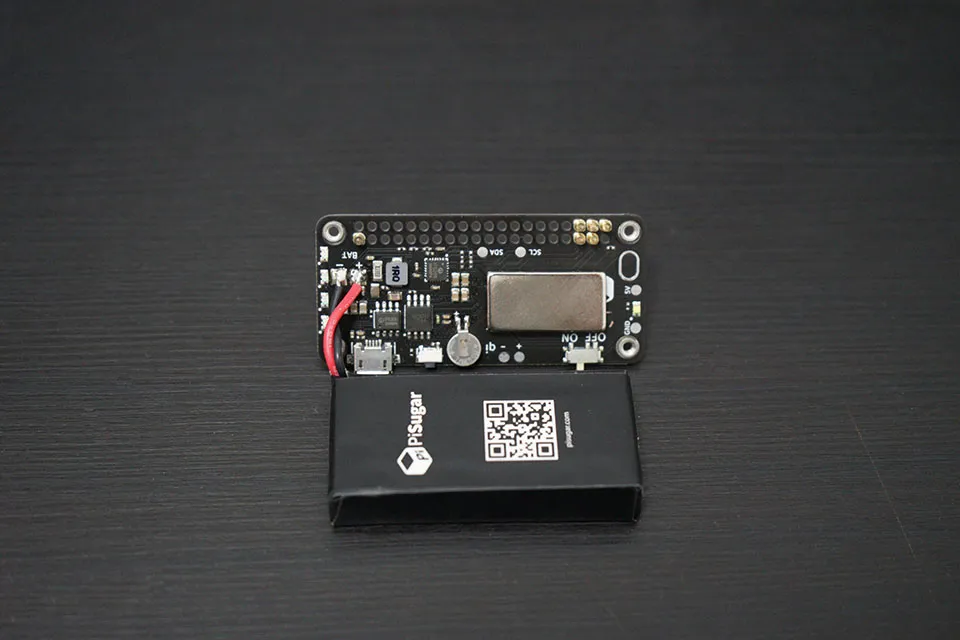
PiSugar modules mount underneath a compatible Pi and use spring-loaded contacts. This is an electrical connection, not wireless power. The contacts can leave the top GPIO header physically accessible, but do not make the electrical resources unused. Models using I2C share that bus with other devices, so address conflicts still matter.
The manufacturer's troubleshooting guide discusses contact with the underside GPIO solder points. It is misleading to describe every connection as an untouched gold test pad. Use the mounting instructions for the exact generation: switch power off, align the board and mounting holes, and secure the supplied screws. Pressing a board into place without correct alignment and support is not the complete installation.
Check cases, cables, coolers and other boards for clearance before assembly. PiSugar's FAQ notes that the Pi 5 Active Cooler's mounting clips can interfere beneath the board. That is a reason to follow its illustrated assembly guidance, rather than assuming every accessory stack fits automatically.
UPS, Clock and Button Features
PiSugar 3 documents UPS operation during external-power connection and disconnection. A suitable charged battery can keep a supported load running, but that is not a measured zero-microsecond transfer with no voltage disturbance under every load. Test your assembled project before depending on it for uninterrupted operation.
A UPS and a graceful shutdown solve related but different problems. The battery supplies energy during an interruption; software must recognise the relevant condition and allow the operating system to stop cleanly before energy is exhausted. Neither protects indefinitely from an oversized load, failed contacts or a depleted battery.
Clock support also depends on the board. PiSugar 2 Plus documents an SD3078 RTC, while PiSugar 3 exposes a DS3231-compatible RTC interface through its MCU. Raspberry Pi 5 already includes its own RTC with an external backup-battery connection, so “all Raspberry Pis lack a hardware clock” is no longer correct. Decide which clock your system will use and how it is initialised, rather than configuring competing devices blindly.
Supported custom buttons can trigger configured actions such as starting a logger or initiating shutdown. These are actions you set up, not proof that single-click, double-click and long-press already perform the particular scripts described in a generic example.
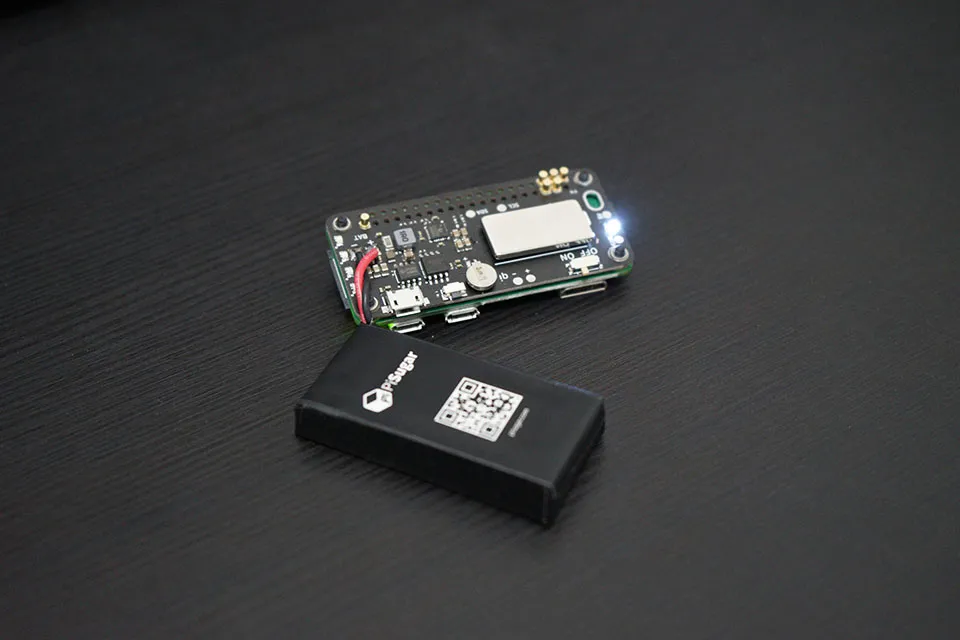
Choose the Model Before Buying
| Example model | Documented fit | Rated battery/output | Communication |
|---|---|---|---|
| PiSugar 3 | Pi Zero family | 1,200 mAh; 5 V, 2.5 A maximum | I2C, normally 0x57/0x68 |
| PiSugar 3 Plus | Listed full-size Pi models, including Pi 5 | 5,000 mAh; 5 V, 3 A maximum | I2C, normally 0x57/0x68 |
| PiSugar 2 Plus, previously Pro | Listed Pi 2/3/4 models; Pi 5 marked unsupported | 5,000 mAh; 5 V, 3 A stated output | I2C, 0x75/0x32 |
These are selected manufacturer specifications, not a complete list or measured runtime comparison. PiSugar 3 Air uses a separately selected single-cell battery, while the S family has different control arrangements. Check the matching page rather than applying one generation's current limit, RTC chip or installation choice to another.
PiSugar marks Pi 2 Plus and S Plus unsupported on Pi 5 because of automatic power-on behaviour after soft shutdown, not simply because of physical dimensions. Its current guide recommends PiSugar 3 Plus for Pi 5. However, that module's 3 A rating is lower than Raspberry Pi's recommended 5 V, 5 A supply capability. Support does not mean unlimited power for a heavily loaded Pi 5 and several peripherals; assess the complete load and recovery behaviour.
Battery mAh is specified at the cell's conditions, not equivalent to the same mAh delivered at the Pi's regulated 5 V. Conversion losses, workload, accessories, battery condition and shutdown settings affect runtime. A repeatable runtime test on your assembled project is more useful than a promised number of hours from capacity alone.
Install the Matching Power Manager
Use the current official Power Manager instructions after mounting compatible hardware. They explain the I2C interface and model selection. The manufacturer documents an HTTPS download-and-run sequence. Downloading the script separately gives you a chance to inspect its installation changes before granting privileges.
On the Pi, download the publisher's installer and inspect it before running:
wget https://cdn.pisugar.com/release/pisugar-power-manager.sh
less pisugar-power-manager.sh
If it matches the official instructions for your system and you accept its installation changes, run:
bash pisugar-power-manager.sh -c releaseThe installer uses package-management privileges and can enable I2C. Select the correct listed model: PiSugar 3, 3 Plus and 3 Air use the PiSugar 3 choice; PiSugar 2 Plus uses the older PiSugar 2 Pro name. PiSugar 2 variants can also differ by LED generation. Choosing whichever name looks newest can give incorrect communication behaviour.
The web interface is reached at the Pi's actual network address on port 8421. Use the router's client list or hostname -I on the Pi to identify an appropriate local address; a default raspberrypi.local name is not guaranteed on every system or network. If needed, check the documented service:
systemctl status pisugar-serverConfirm that the dashboard reports plausible battery and charging information. Battery voltage is different from the regulated supply voltage delivered to the Pi, and a reported chip temperature is not necessarily the pouch-cell temperature. Keep the management interface on a trusted network, configure supported authentication and restrict access; there is no reason to forward a battery-control port directly onto the internet.
Configure Shutdown and Recovery Deliberately
Enable the documented safe-shutdown level and delay for the project, allowing enough time for applications to save data and the operating system to halt. A universal 5% or 3.4 V threshold is not appropriate evidence of adequate margin for every cell and load. Check what happens under your normal workload before relying on the setting unattended.
There are two stages to distinguish: stopping Linux and asking the module to remove its power output. PiSugar's FAQ says its software must notify PiSugar 3 for soft power-off; if the blue LED stays on after shutdown, check hardware communication and the correct Power Manager installation. Merely appending a power-cut action after a shell poweroff command is not a verified complete sequence.
For custom scripts, start with a simple, observable action and confirm which button event triggers it. Test data-saving behaviour separately before assigning shutdown. Avoid commands that modify unrelated I2C devices or arbitrary power registers. Address reuse by a sensor can produce more than a missing dashboard reading.
Scheduled wake-up is useful for intermittent logging, but it depends on a configured clock, retained battery power and the model's switch/firmware behaviour. For example, PiSugar 2's documented scheduled-wake arrangement requires its power switch left on. Test shutdown, wake and external-power restoration as separate cases; one successful boot is not proof that all three work.
Check the Complete Portable Project
A field logger, handheld display or compact test instrument can benefit from this arrangement. Count the Pi, screen, storage, radios and other loads, including peak activity. A battery module powers the connected Pi project; it does not automatically keep the Wi-Fi access point, switch or internet connection available during an outage.
Run a controlled external-power interruption with important data backed up, observing whether the project stays running and whether it shuts down cleanly at the intended level. Then check whether it resumes in the way you expect. Keep notes on configuration, model, battery and workload rather than treating a vendor UPS label as an acceptance test.
If the module is undetected, power everything off and inspect alignment and contact first. Follow the manufacturer's FAQ rather than scraping or soldering a live board. A working power connection does not prove the I2C contacts are sound. After a software or firmware change, repeat the communication and shutdown checks relevant to your project.
Follow the Module's Battery Instructions
PiSugar describes these modules as developer tools requiring familiarity with its instructions. Use supplied or recommended parts, protect exposed contacts from conductive objects, and avoid crushing or piercing the battery. Do not continue using a swollen, leaking or damaged cell; follow the manufacturer's disposal guidance.
Its current safety page states a 0–40°C battery operating range. Follow the particular cell and module instructions rather than substituting a generic 45°C charging limit. The charging chip can become hot, and its temperature is not the same measurement as the battery's. Do not assume an unverified thermistor automatically protects every generation from all thermal problems.
Keep the assembly dry and ventilated, away from direct sun or a closed hot vehicle. Charge through the module's documented charging input; plugging a supply into the Pi is not automatically the same as charging PiSugar. For storage, follow the supplier's guidance and check the battery periodically instead of treating a universal voltage or percentage as proof of long-term safety.
A Useful Portable-Power Option
PiSugar remains an appealing way to make a supported Pi project more portable with compact mounting and manageable power features. Its value is strongest when the chosen board, battery and workload match, and when shutdown and recovery have been checked on the actual build. Start at the original PiSugar website, retain the original GitHub guide link, and use the current documentation for your model. More Raspberry Pi projects can help decide what to build next.