If you are following along with our Build your own homelab, you might already have Plant-it installed on your Proxmox server to help with the management of your plants. You can install Plant-it via a Helper Script LXC container or in a Docker instance, either way. Since we installed Plant-it the first time, it seems that there are certain things lacking. For one, although we have integrated with FloraCodex, there are still some obvious plants missing (why can't I find most of the Chilli cultivars I am growing?) That said, even if we do find it, Plant-it does not really have information on plant care etc, so it sometimes begs the question: why integrate in the first place? But the one thing that annoys me the most is that I have set up a watering schedule for every Monday, but my notification arrives on Tuesdays. I have tried everything (bar deleting my plant and creating it again), but I can't fix this. Also, the photos of your plants are not organized in a timeline, so you don't know when a photo was taken. But this article is not about me complaining about features I would love to see in Plant-it (which we still love and use, that is why we want to see it flourish!), but to look at an alternative: HortusFox.
What is HortusFox? The Digital Greenhouse for Your Homelab
HortusFox is a web-based application that allows you to meticulously track and manage your entire plant collection. Think of it as a centralized database for your green companions, accessible from any device with a web browser. Because you host it yourself, you retain complete control over your data – a significant plus for privacy-conscious individuals.
At its core, HortusFox is built on PHP and uses a MariaDB database, making it a relatively straightforward addition to a standard homelab setup. The most common and recommended way to deploy HortusFox is through Docker, simplifying the installation and management process to a few commands. This ease of setup makes it an accessible project for both seasoned homelab veterans and those just starting their self-hosting journey.
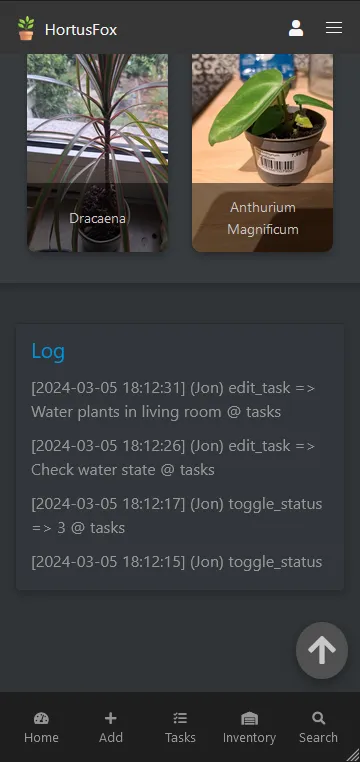
A Thriving Ecosystem of Features: What HortusFox Offers
HortusFox is more than just a simple plant tracker; it's a comprehensive ecosystem designed to cater to every aspect of plant care. Let's explore its impressive feature set in detail:
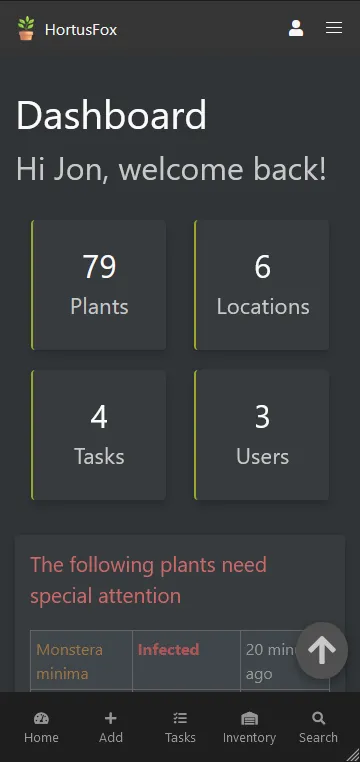
- Dashboard: Your central command center, the dashboard provides a quick overview of your plants, upcoming tasks, and recent activities. It's the first thing you see when you log in and is designed to give you an at-a-glance understanding of your garden's status.
- Plant Management: This is the heart of HortusFox. For each plant, you can add a wealth of information, including its name, species, location within your home, and a picture for easy identification. You can also add detailed notes about its specific needs, such as watering frequency, light requirements, and fertilizer schedules.
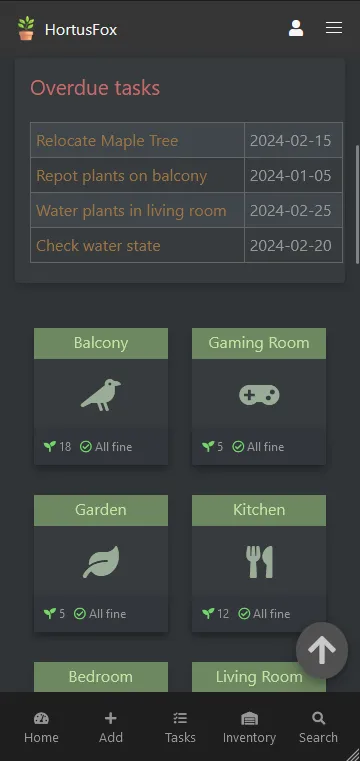
- Task Management: Never forget to water your fiddle-leaf fig again! HortusFox's task management system allows you to create recurring or one-off tasks for each plant. You'll receive reminders for watering, fertilizing, repotting, and any other custom care instructions you define.
- Inventory Management: Keep track of your gardening supplies with the built-in inventory system. Log your soil, fertilizers, pots, and tools, so you always know what you have on hand and what you need to restock.
- Calendar System: Visualize your plant care schedule with the integrated calendar. It provides a clear overview of all your upcoming tasks, making it easy to plan your gardening activities.
- Collaborative Care: HortusFox is designed with collaboration in mind. You can create multiple user accounts, allowing family members or housemates to share the responsibility of plant care. A built-in chat feature facilitates communication and coordination.
- History and Growth Tracking: Document your plant's journey with a detailed history log. You can upload photos to track its growth over time, creating a visual diary of its progress from a small seedling to a flourishing specimen.
- Weather Forecast: For those with outdoor plants, the weather forecast integration (using a free OpenWeatherMap API key) is a handy feature to help you anticipate your plants' needs.
- Themes and Customization: Personalize your HortusFox experience with different themes. This allows you to tailor the look and feel of the interface to your liking.
- API Access: For the more technically inclined, HortusFox offers a REST API, opening up possibilities for integrations with other applications and services in your homelab.
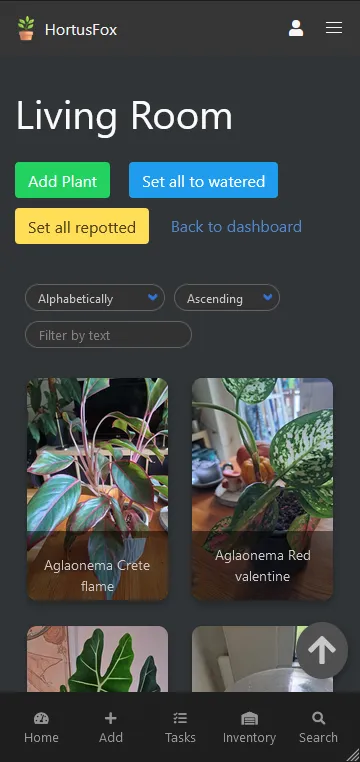
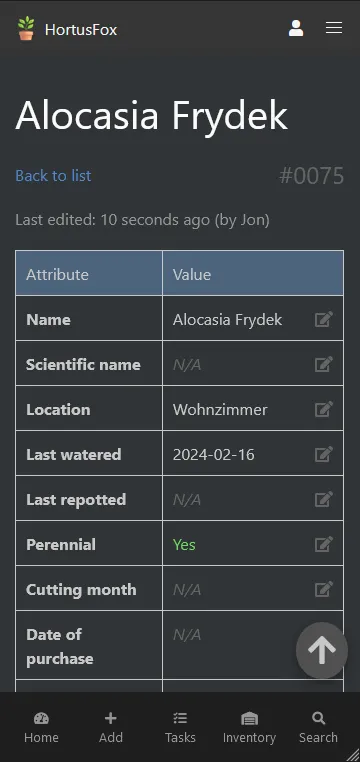
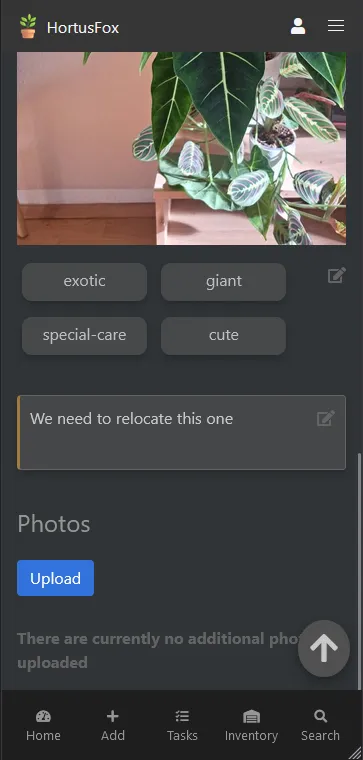
Version context: The Plant-it experiences and comparison below describe the legacy web deployment used for this article. They remain the author's observations and preferences. The Plant-it 1.0 release notes describe a different architecture without that backend, discontinued web/iOS support and no automatic transfer of the older database. Do not treat the comparison as a feature matrix for every later release.
HortusFox vs. Plant-It: A Tale of Two Gardening Philosophies
Another popular name in the self-hosted plant management space is Plant-It. While both applications aim to help you care for your plants, they approach the task with different philosophies.
| Feature | HortusFox | Plant-It |
|---|---|---|
| Core Philosophy | Comprehensive plant management and scheduling | Simple and straightforward activity logging |
| Primary Function | Proactive scheduling and detailed tracking | Reactive logging of care events |
| Task Management | Robust system with recurring tasks and reminders | Basic reminders based on last activity |
| Inventory Management | Included | Not a primary feature |
| Collaboration | Multi-user support and built-in chat | Primarily single-user focused |
| User Interface | Feature-rich dashboard and detailed plant views | Minimalist interface focused on event logging |
| Extensibility | REST API for integrations | More limited in extensibility |
HortusFox is the more feature-rich and proactive of the two. It's designed for users who want a detailed and organized system to manage every aspect of their plant care, from scheduling watering to tracking inventory. The collaborative features make it an excellent choice for households where multiple people share the responsibility for the plants.
Plant-It, on the other hand, adopts a more minimalist and reactive approach. Its strength lies in its simplicity. The focus is on logging the care activities you've already performed, such as watering or fertilizing. It helps you answer the question, "When was the last time I watered my snake plant?" While it does offer basic reminders, its primary function is to be a digital logbook of your plant care.
Which One Should You Host? Or Can You Justify Both?
The choice between HortusFox and Plant-It ultimately comes down to your personal needs and preferences.
Choose HortusFox if:
- You want a comprehensive and proactive plant management system.
- You value detailed scheduling and reminders.
- You want to track your gardening inventory.
- You share plant care responsibilities with others.
- You enjoy having a feature-rich application with customization options.
Choose Plant-It if:
- You prefer a simple and straightforward way to log your plant care activities.
- You don't need detailed scheduling and are happy with basic reminders.
- You are the primary caretaker of your plants.
- You appreciate a minimalist and focused user interface.
Is it viable to host both? For the average user, hosting both would likely be redundant. HortusFox can fulfill the logging capabilities of Plant-It while offering a much broader set of features. However, a user who is deeply committed to a very specific and manual logging workflow might find Plant-It's focused approach appealing for its simplicity, while still using HortusFox for its more advanced features like inventory and collaborative tools. In most scenarios, however, choosing one that best aligns with your plant care philosophy will be the most efficient approach.
Conclusion: Cultivate Your Digital Garden with Confidence
For the self-hosting enthusiast looking to bring their passion for plants into their homelab, HortusFox presents a compelling and feature-rich solution. Its comprehensive approach to plant management, from detailed scheduling and inventory tracking to collaborative care, provides a powerful tool to help your urban jungle thrive. While Plant-It offers a simpler, more focused alternative for logging care activities, HortusFox's extensive feature set makes it the more versatile and all-encompassing choice for most users.
By deploying HortusFox in your homelab, you not only gain a powerful tool for nurturing your plants but also embark on another rewarding self-hosting adventure. So, fire up your Docker instance, give HortusFox a try, and watch your digital and physical gardens flourish in harmony.
Visit the official HortusFox website
Optional Deployment and Maintenance Context
Use these optional checks to evaluate a deployment against your own plant-care needs. They do not establish the cause of the reminder problem described above.
For a fresh HortusFox deployment, start with the maintained project instructions and official Compose file. The application uses PHP and Asatru with MariaDB. Review the selected release and its dependencies before deploying.
git clone https://github.com/danielbrendel/hortusfox-web.git
cd hortusfox-web
Inspect the Compose file before starting it. Set your own admin email, unique admin password and matching application/database credentials. Choose APP_TIMEZONE deliberately, such as Africa/Johannesburg. Keep the database private: remove its published host port when only the app needs to connect. For an initial test on the Docker host, bind the web port to 127.0.0.1:8080:80, then arrange private or authenticated HTTPS access separately if needed.
Preserve the application's actual mounted paths. The upstream file uses /var/www/html/, including photographs, attachments and other persistent application directories. Mount paths must match the filesystem inside the selected image. Keep database storage as well; preserving photographs alone does not preserve plant records.
docker compose config --quiet
docker compose pull
docker compose up -d
docker compose ps
docker compose logs --tail=100 app
Check Reminders with One Test Plant
Create one test plant and an innocuous task. Record the expected local date, recurrence and notification destination. Check what appears in the calendar, what actually arrives, and whether completing the task changes the next occurrence as intended. Repeat across a date boundary before relying on it for the whole collection. This is a proposed check, not a claim that the author's earlier problem has been reproduced or fixed.
The upstream cronjob reference documents HTTP endpoints protected by a cronpw token, including recurring-task and overdue-task processing. Use this documented mechanism rather than assuming a generic scheduler command exists. Use the endpoints and scheduling instructions for your installed release, protect the token, and inspect a response/log before scheduling repeated requests. Do not assume task processing automatically provides PWA push, low-inventory alerts or frost alarms.
The weather integration contacts OpenWeatherMap. Confirm that your key and selected API meet its current access rules, and test the displayed location and units. Forecast information should support your judgement; it does not measure the moisture in a pot or guarantee protection from frost.
Keep a Recoverable Plant History
Before an upgrade, save a consistent database backup and the mounted photographs and attachments, plus the configuration needed to restore them. Keep a copy away from the server. Test restoration in an isolated instance and check a plant, its location, a photograph, a note and a task. Preserve the older instance until the restored records are usable.
Use the test plant to compare the workflow with your own preferences. If a feature does not work as expected, record the application version, task settings, timezone and a harmless reproduction. That makes a useful support report without changing the author's original experiences or assuming every plant-care tool must suit the same person.