Building your own homelab is probably one of the most rewarding journeys a tech enthusiast can undertake. You've conquered photo and video backups with Immich, managed network-wide name resolution with Technitium DNS, and started to manage your herbarium with Plant-it. But what about one of the most fundamental internet services: email? The idea of hosting your own email server can seem daunting, but with tools like BillionMail, it's more accessible than ever.
What Is BillionMail?
BillionMail combines a self-hosted mail-server stack with newsletter and email-marketing management. Its upstream repository describes reusable templates, contacts, campaigns and delivery/open/click analytics. The project is licensed under AGPLv3. Free software is an attractive starting point for a homelab, but running a mail service still creates infrastructure and administration costs.
SMTP transfers mail between servers and accepts submissions from clients. It is not the same thing as a browser-based inbox. The project's Compose stack contains Postfix for mail transfer, Dovecot for mailbox access and Roundcube for webmail, alongside database, filtering and management components. You can manage a campaign in BillionMail, submit an outgoing message to its server, and use a relay for the next leg of delivery. Those are separate roles.
Features and Their Practical Limits
- Local management: You operate the contact lists, mailbox storage, templates and campaign dashboard. That gives useful control over access and retention, provided the host and backups are maintained.
- Reusable campaigns: Templates and list management can make regular newsletters easier to organise. Check a rendered test message in the actual clients your readers use.
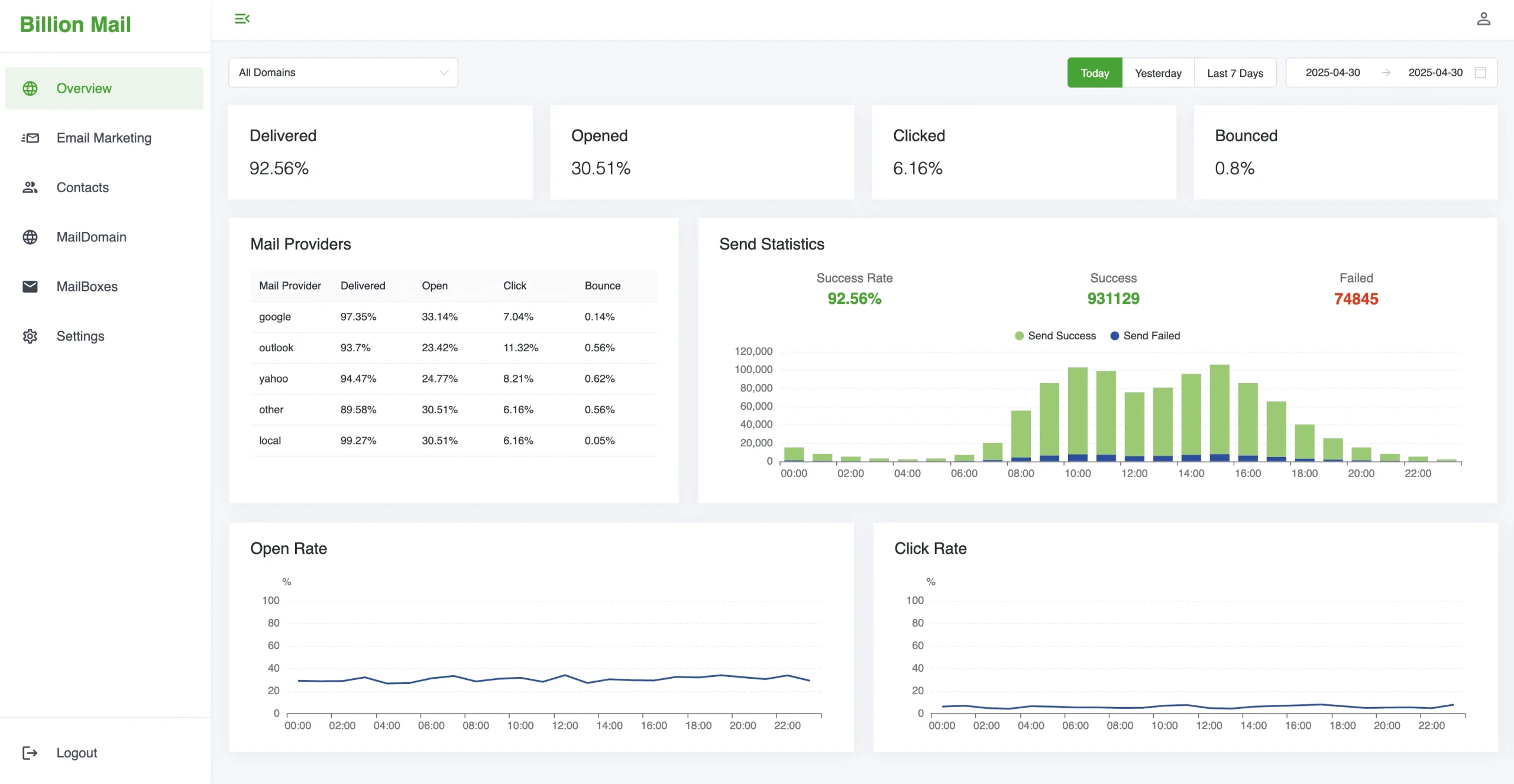
- Analytics: Delivery, opening and click figures help investigate campaigns, but they represent observed events rather than a perfect count of people reading. A queued message is not proof of inbox placement.
- No software-imposed sending subscription: The project advertises unlimited sending. Your hardware, upstream relay limits, receiver policies, account quotas and reputation still impose practical limits.
- Mailbox access: Roundcube provides a webmail interface. SMTP alone does not replace IMAP, mailbox storage or a mail client.
Self-hosting also does not make email end-to-end private automatically. Recipients use other mail services, and an external relay processes the messages routed through it. Protect administrative access, mailbox credentials and backups. Decide whether analytics and contact retention are appropriate for the audience rather than collect every available field by default.
Residential Connections and Reliable Delivery
Before installing, ask your provider about server use, reachable addressing, inbound and outbound TCP port 25 and reverse DNS control. These are distinct requirements. An outbound relay can help when direct sending is blocked; it does not, by itself, make an unreachable home server receive incoming mail.
A changing public address can cause outages and stale DNS answers. An SPF policy that lists an old address may no longer authorise the new sender, but the SPF record does not become syntactically invalid simply because the address changes. SPF can also use DNS-based mechanisms that resolve addresses. DNS caching and an unsuitable residential sending range remain concerns even when DDNS updates successfully.
A static address is only one prerequisite, not an inbox guarantee. Providers may restrict port 25 on VPS products too. Check their policy before paying for a server, and confirm who can set its PTR record. A VPN tunnel to a VPS creates another routing component to manage; it does not automatically give that address a good reputation or configure the mail server correctly.
Mail DNS and Authentication: Different Jobs
A universal “four records guarantee delivery” checklist is misleading. The following records and mechanisms solve different problems:
| Item | Role | What to verify |
|---|---|---|
| MX and A/AAAA | Identify the domain's receiving server and resolve its address. | The public destination is reachable and actually accepts mail for your domain. |
| PTR with matching forward DNS | Maps the sending address back to a hostname. | The address provider controls the PTR; the hostname resolves back to that address. This is not authorisation to send for every domain. |
| SPF | Authorises sending hosts for an SMTP envelope identity. | Include legitimate sending services in one coherent policy and avoid exceeding the protocol's DNS-lookup limits. |
| DKIM | Lets receivers verify a domain signature over signed message data. | Publish the correct selector/key and confirm actual outgoing signatures verify. |
| DMARC | Connects the visible From domain to aligned SPF or DKIM authentication and publishes a requested handling policy. | At least one aligned mechanism must pass. Inventory real senders and inspect reports before enforcing stricter handling. |
RFC 7208 defines SPF around SMTP identities rather than simply the address shown in the From header. DMARC is not a requirement for both SPF and DKIM to pass simultaneously. Its alignment model explains why an authenticated relay identity may still differ from the domain your readers see.
Receiver rules also vary by volume and purpose. Gmail's sender guidelines require SPF or DKIM for all senders, with SPF, DKIM and DMARC for bulk senders in its defined category, alongside forward/reverse DNS and TLS. Marketing and subscribed bulk messages also require one-click unsubscribe. Correct authentication does not override complaints, unwanted mail or other spam signals.
Using an SMTP Relay
For a home connection, I still favour the hybrid approach: manage the application locally and use an appropriate relay for outbound delivery. It avoids asking the home connection to solve every internet-mail problem, while preserving local management. It also means trusting and paying attention to the relay's terms, quotas and treatment of your data.
BillionMail's relay documentation adds a sending domain first and binds one relay to that domain. Configure its endpoint and dedicated SMTP credentials, authenticate the domain as the provider requires, then send controlled tests. A successful “Test Connection” checks the connection; inspect a received message's headers and delivery result as well. Provider sandbox restrictions may need to be lifted before sending to ordinary recipients.
Keep crucial system alerts independent of the service they report on. If BillionMail or its host fails, an alert sent only through that same stack may never leave it. Consider a separate delivery route for those notifications.
Evaluate the Real Cost
Budget for a domain, host or VPS, storage, backups, relay charges, monitoring and your time. Software licensing cost alone does not establish that self-hosting is cheaper. Light notification traffic and a newsletter with a growing audience have different sending and support needs.
SendGrid, Mailgun, Amazon SES, Postmark and Brevo are examples to investigate, rather than promises of fixed free allowances. Twilio retired SendGrid's free plans starting in May 2025; the old “100 emails a day forever” offer is not a basis for an ongoing budget. Verify current plans, trial expiry, regional availability and whether your message type is permitted before selecting any provider.
Match the Platform to the Job
When comparing BillionMail with Mailcow, Docker-Mailserver or Stalwart, begin with your requirements: ordinary mailboxes, campaigns, a transactional sending API, webmail, filtering and administration. Then inspect each project's current documentation. A small quoted RAM footprint is not a fair comparison without the same workload, filtering, mailbox count and retention settings.
BillionMail's appeal here is the combination of mail handling and campaign management. If the job is only a few application notifications, first check whether the application can submit directly to a suitable relay. Avoid maintaining a full mailbox and marketing stack unless it supplies value you actually need.
Prepare for Maintenance and Recovery
The installation prerequisites specify Linux with amd64 or arm64 support. Use the project's deployment guidance and its matching Compose/environment files rather than a one-container approximation. Review the bound ports, domain hostname, administrator defaults and database credentials before making it reachable. Change default credentials and avoid exposing database or management interfaces unnecessarily.
The upstream stack persists more than messages: it includes mailbox data, database state, configuration, certificates, queue data and other service files. Plan consistent backups and protect credentials within them. Test recovery on a separate host, including mailbox access, domain settings and signing keys. Schedule upgrades when you can inspect logs, queues and a received test message afterwards.
Conclusion
BillionMail is an appealing learning project and a capable way to bring email management into the homelab. The hybrid relay approach remains my practical recommendation for residential hosting. Give DNS, receiver requirements, recovery and operating costs the same attention as the dashboard, so local control becomes a dependable service rather than an unexpected maintenance burden.