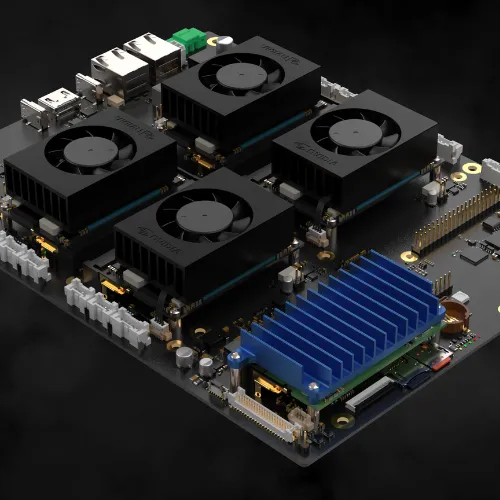
The Cerebro Clusterboard is a modular carrier-board project designed around up to four compute modules, with Raspberry Pi CM4/CM5, NVIDIA Jetson NX and Radxa CM5 families advertised by its developer. Its appeal is easy to understand: a tidy baseboard can replace a collection of separate development boards, power leads and peripheral cables. We find that modular approach particularly interesting for homelabs, edge AI and learning about distributed systems.
This is a project overview rather than a hands-on performance review. The 2025 crowdfunding proposal and a current retail product are different things. Before planning a deployment, establish what hardware can actually be ordered and what documentation supports the specific modules you intend to install.
What Is a Clusterboard?
A clusterboard hosts several compute modules on one carrier. Each module is still a separate computer with its own processor, memory and operating system. The carrier provides connections and management facilities so those computers can be organized more conveniently. Raspberry Pi's Compute Module documentation explains the distinction: a module contains the core computing components, while its IO board exposes power and peripheral interfaces.
Four modules do not become one processor with automatically combined RAM. Applications must either run as separate services or be designed to distribute work between machines. This makes a cluster useful for multiple jobs or replicas, but installing more nodes will not automatically accelerate an ordinary single-process desktop application. That distinction matters more than the number of slots when deciding whether a cluster fits your workload.
How the Carrier and Management Fit Together
Cerebro's developer advertises HDMI and USB multiplexing, an onboard maker microcontroller, a BMC management concept and up to three M.2 expansion slots per node. The site's headline describes an onboard KVM with USB connectivity up to 10 Gb/s. That is a USB interface claim, not a 10 Gigabit Ethernet specification or an application benchmark.
A multiplexer selects which node is connected to a peripheral path. It should not be assumed to give every node simultaneous exclusive access to the same keyboard, screen or storage device. For a planned build, request the port-routing diagram and identify which connections are shared, switchable or dedicated. Ask which console functions work when a node's operating system will not boot, and which depend on additional management hardware or firmware.
M.2 is also a connector family, not a promise that every SSD, modem or accelerator will work. Before ordering expansion cards, obtain the slot keys, supported protocols, lane allocation, power limits and permitted card lengths for the intended node. A large socket count is only useful when the required interfaces are actually routed and supported by that module's software.
Why the Modular Approach Is Appealing
The attraction is the possibility of choosing different compute resources within a compact carrier layout. A general-purpose Linux service might need CPU and memory, while an AI application may need a supported accelerator and its software stack. That flexibility could reduce the need to rebuild an entire enclosure when changing one workload.
It remains a purchasing consideration rather than a guarantee of unlimited upgrades. Confirm whether different module families can be installed together on the exact carrier revision, which adapters are needed, and which ports each combination retains. Also consider the common components: several nodes sharing one carrier and power supply can be affected by a single board or power failure. Physical neatness does not by itself establish high availability.
Module Compatibility Requires More Than a Matching Shape
The developer names Raspberry Pi CM4/CM5, NVIDIA Jetson NX and Radxa CM5 families. Treat that as the advertised compatibility scope and obtain an exact SKU list before choosing RAM, storage or a cooling solution. Do not interpret it as approval for every Jetson model, every future compute module or any board described as a computer-on-module.
Even closely related Raspberry Pi modules need care. CM4 and CM5 use dual 100-pin connectors, but Raspberry Pi lists reduced functionality when either is used on the other generation's official IO board. A mechanically similar module therefore does not establish complete electrical and software compatibility with a third-party carrier. Check boot support, device-tree configuration, networking, USB and PCIe against the carrier's own tested matrix.
Choose the operating-system image for each module and verify the applications before committing to a mixed cluster. Docker's multi-platform documentation explains that containers share the host kernel and need compatible architecture variants; a container does not inherently convert an x86 binary into an ARM binary. GPU-dependent applications also need the appropriate drivers and runtime on the node that will execute them.
Power, Cooling and the Enclosure
The project is advertised for a Micro ATX case or a 1U rack enclosure. That is a starting point for mechanical planning, not proof that an arbitrary chassis will accommodate your chosen heatsinks, adapters and cables. Request mounting dimensions and the completed assembly's height, and check clearance above modules and expansion cards. A rack's nominal size does not resolve those details.
Calculate the supply requirement from the installed modules, storage, accelerators, fans and the carrier specification, allowing for startup demand. Use the verified input range and connector instructions for the actual board; do not select a high-voltage supply from an unconfirmed launch-era figure. Keep the management interface and node-network arrangement documented so power recovery is predictable.
Cooling needs depend on the modules and workloads. Provide airflow across the components that need it and check each manufacturer's temperature limits. Measure under a representative workload, including throttling behavior and fan noise, rather than assuming a particular fan size will keep every node below 60°C. A quieter chassis is useful only if it preserves acceptable sustained performance.
Availability and a Practical Planning Checklist
The original announcement described an April 2025 Kickstarter launch. The official Cerebro campaign page is now labeled Canceled and lists a funding period of 30 April–14 June 2025. The developer website still shows launch-era early-bird pricing and coming-soon language. Those pages do not establish current stock, delivery dates or a completed production configuration. Confirm those directly before spending money; no reason for the cancellation or later shipping outcome is assumed here.
Make a complete budget rather than comparing the carrier alone with a ready-to-run server. Include modules, required adapters, storage, power, cooling, enclosure, tax and delivery. Ask what management hardware is included, how firmware is updated, and where recovery instructions and source files are published. Check the support route and whether replacement parts can be bought separately.
A sensible plan starts with one defined workload and a compatible module, followed by a documented recovery process. Record which module occupies each position, how its storage is restored and how its network address is assigned. Expand after confirming that the application, cooling and management workflow behave as required; purchasing four different modules first makes troubleshooting unnecessarily difficult.
Useful Cluster Workloads and Their Limits
For education or a homelab, separate nodes can host monitoring, messaging, test applications and container orchestration. K3s requirements list supported CPU architectures, unique node naming and resources needed by the platform itself. Workloads need additional capacity. Its documentation also recommends SSD storage for write-intensive cluster databases on Raspberry Pi or other ARM systems, so storage selection deserves attention alongside CPU specifications.
For edge AI, use a module with a supported runtime for the intended model and measure inference on that node. Multiple modules can handle separate camera streams or independent jobs; they do not automatically pool accelerator memory. Likewise, distributed builds or rendering require software that supports splitting the task, with network transfer and coordination considered when evaluating whether extra nodes help.
A cluster can teach recovery and scheduling, but valuable services still need backups outside the board. Save application data and configuration independently of the compute modules, then test restoring them. Decide which functions must stay available during a carrier or power outage before treating an experimental cluster as the only home for them.
An Interesting Concept Worth Evaluating Carefully
Cerebro's mix of module choice, expansion and shared management remains an appealing concept for people who enjoy building compact clusters. Our enthusiasm is for that flexibility and the projects it could enable. Its suitability for a real deployment depends on confirmed availability, exact compatibility, recoverable software and a well-planned power and cooling arrangement. Evaluate those details before expecting a rack-ready production platform or a particular performance gain.
Visit the official Cerebro Clusterboard website