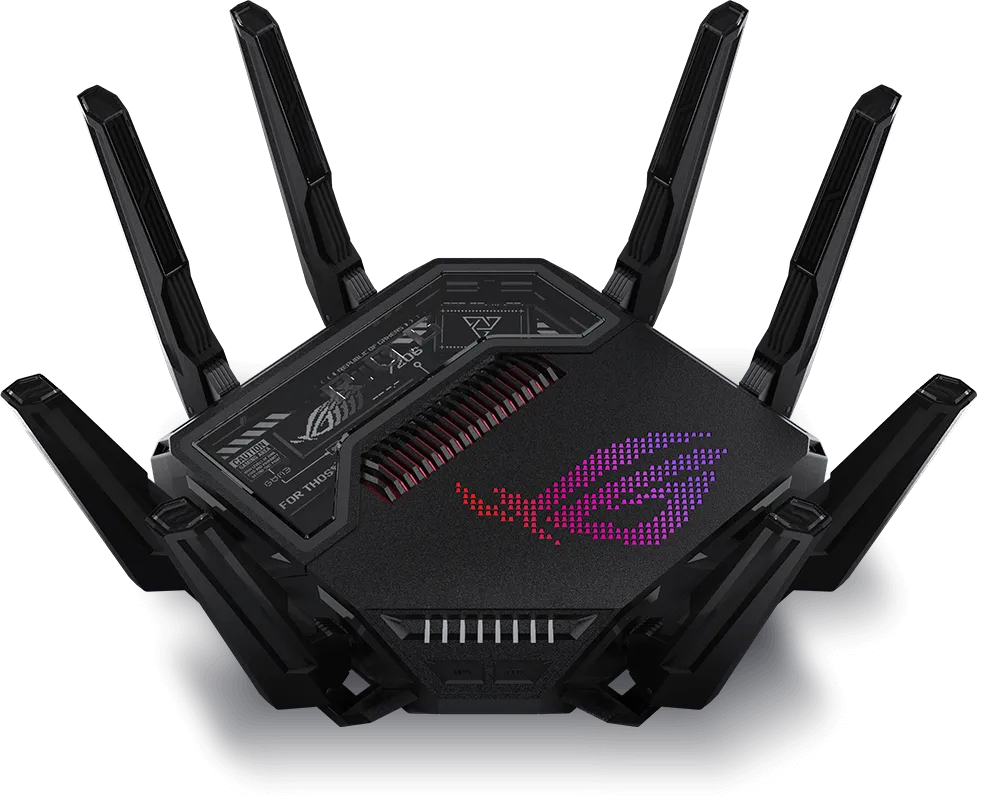
In today’s fast-paced, digital world, having a reliable internet connection is essential for work, entertainment, and staying connected. Not to mention gaming. All gamers will agree that lag sucks. As such, having a fast and reliable internet connection is essential for all consumers. On this site, we have numerous Mesh Networking systems to read up on, but we don't forget about a good old router once in a while. For an in-depth explanation on what a router is and how it works, read our article explaining routers. But let's see if the ASUS ROG Rapture GT-BE25000 can stack up with easy-to-install mesh network nodes.
Routers vs. Mesh Systems: A Quick Comparison
Routers work best when placed in the center of your home, but sometimes walls, floors, or large spaces can weaken the signal. A mesh system uses multiple devices, usually a main router and additional nodes, to improve coverage across larger or multi-level homes. Its results still depend on placement, the connection between nodes and the devices using the network.
While the ASUS ROG Rapture GT-BE25000 is a high-performance router that can cover large spaces, it also supports AiMesh, ASUS’s mesh networking technology, which lets you add more compatible ASUS devices to create a wider network with better coverage.
Some users want more control than a basic mesh kit offers: traffic prioritisation, VPN routing or guest access rules. Compare the exact models and firmware rather than assuming every standalone router has more features or every mesh system requires subscriptions. Creating many network names also consumes airtime through management traffic; a few networks with clear purposes are more useful than an impressive SSID count.
Understanding AiMesh
AiMesh is a feature that allows you to combine multiple ASUS routers into one unified network. This means you can start with the GT-BE25000 and add other AiMesh-compatible ASUS routers around your home to create a broader Wi-Fi coverage without replacing your main router. AiMesh provides the flexibility to expand your network over time, which is perfect for larger homes or homes with Wi-Fi dead spots.
Specs of the ASUS ROG Rapture GT-BE25000
The ASUS ROG Rapture GT-BE25000 is a powerhouse. Here’s a quick look at its specs to give you an idea of its capabilities:
| Feature | Details |
|---|---|
| Wi-Fi Standard | Wi-Fi 7; supported features depend on client, operating system, region and firmware |
| Frequency Bands | Quad-band (2.4 GHz, 5 GHz (2), 6 GHz) |
| Advertised radio link rates | BE25000 class: approximately 24,433 Mbps combined across four radios 2.4 GHz: 1,376 Mbps 5GHz-1: 5,764 Mbps 5GHz-2: 5,764 Mbps 6GHz: 11,529 Mbps |
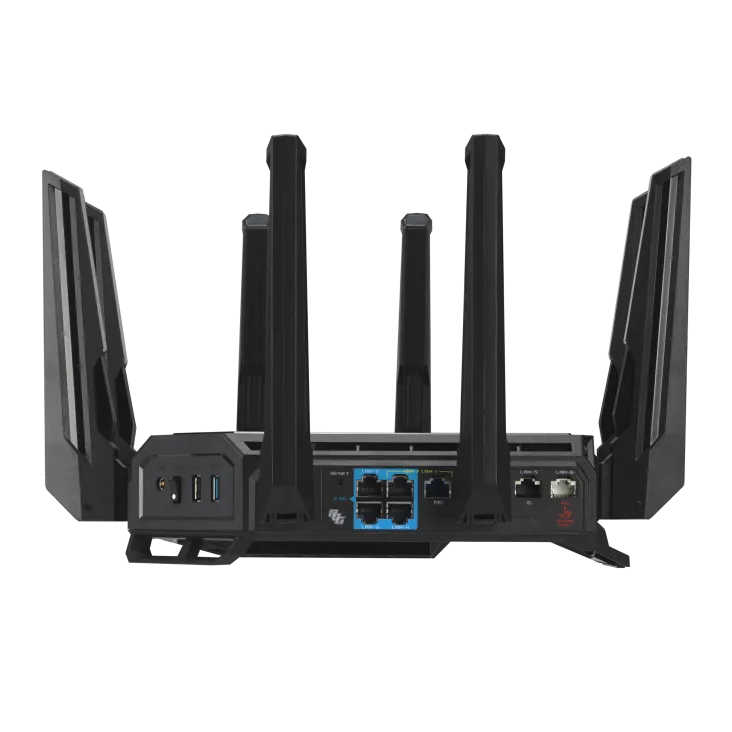
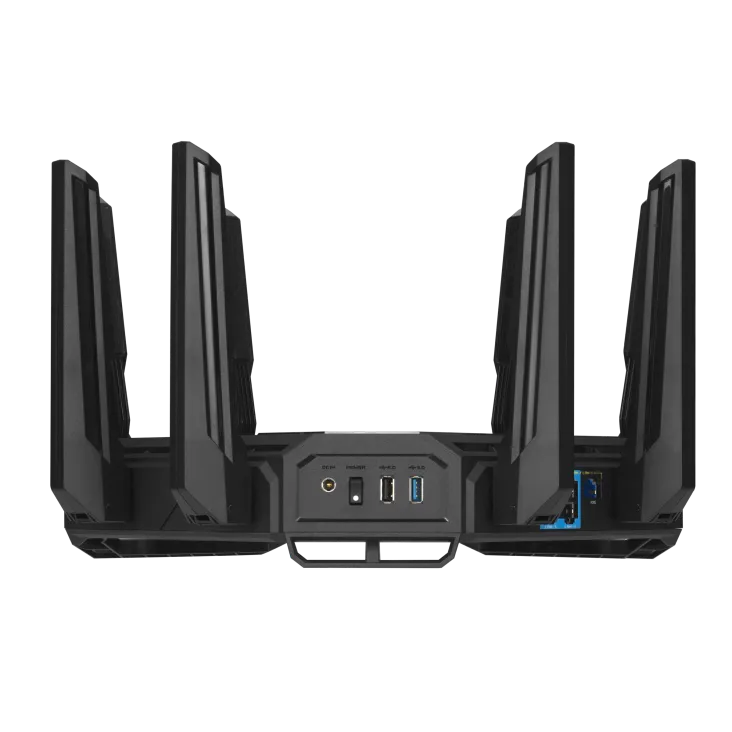
| Ethernet Ports | 1x 10Gbps for WAN/LAN 1x 2.5Gbps for WAN/LAN 1x 10Gbps for LAN 3x 2.5Gbps for LAN 1x 1 Gbps for LAN (Total 7 ports) |
| Antennas | 8x External |
| Transmit / Receive | 2.4GHz 4x4 5GHz-1 4x4 5GHz-2 4x4 6GHz 4x4 |
| Processor | 2.6 GHz quad-core |
| Memory | 256 MB flash, 2 GB RAM |
| AiMesh Support | Yes, can connect with other ASUS AiMesh routers |
| Gaming Features | Game Boost, VPN Fusion, Gaming Ports |
| Security | AiProtection Pro, WPA3 security, parental controls (Learn why WPA3 is important) |
What the Four Radios Can Contribute
The GT-BE25000 has one 2.4 GHz radio, two 5 GHz radios and one 6 GHz radio, each listed as 4x4 transmit/receive. The advertised speeds add the theoretical link rates of all four radios. A single laptop does not receive that combined rate, and application throughput is lower after protocol overhead and other traffic.
Two 5 GHz radios provide extra flexibility for distributing compatible devices or carrying mesh traffic. The 6 GHz radio can serve Wi-Fi 6E and Wi-Fi 7 clients, while older Wi-Fi devices need a band they support. Wi-Fi 6E clients can use 6 GHz without acquiring Wi-Fi 7's 320 MHz or 4096-QAM capabilities.
ASUS lists maximum widths of 40 MHz at 2.4 GHz, 160 MHz for each 5 GHz radio and 320 MHz at 6 GHz. Those are capabilities rather than a recommendation to use the widest setting everywhere. Local spectrum rules, client support and neighbouring networks affect the available choices. A compatible client close to the router is better placed to benefit from a wide channel than a device behind several walls.
A separate radio does not create a congestion-free band. Nearby networks and mesh nodes still share spectrum. Multi-Link Operation also requires the appropriate router firmware, client hardware and operating-system support. Check the release notes and the client's capabilities instead of assuming every Wi-Fi 7-labelled device can use every combination of links.
Planning the Multi-Gigabit Wired Connections
The port layout is particularly appealing for a homelab: two 10 GbE ports, four 2.5 GbE ports and one Gigabit port, making seven Ethernet ports in total. One 10 GbE port and one 2.5 GbE port have WAN/LAN roles. Assigning an Internet uplink changes which ports are available for local equipment.
| Port group | Possible role | What to verify |
|---|---|---|
| 10 GbE WAN/LAN | High-speed Internet handoff, or LAN when configured accordingly | ISP equipment, WAN settings and negotiated Ethernet link |
| 10 GbE LAN | NAS, server or a switch serving several fast clients | Matching switch/NIC speeds, cabling and storage throughput |
| 2.5 GbE WAN/LAN plus three 2.5 GbE LAN | Additional uplink option, desktops or wired AiMesh nodes | Chosen WAN role and the speed of the node's backhaul port |
| Gigabit LAN | TV, printer or another lower-bandwidth wired device | One Gigabit link remains its local ceiling |
For example, using the 10 GbE WAN/LAN port for the ISP and the 10 GbE LAN port for a core switch gives a clear high-speed path to several local devices. A NAS and workstation both attached to that switch can exchange local traffic without Internet bandwidth being involved. Actual file transfer speed also depends on disk performance, protocol, client CPU and other traffic.
Port ratings do not establish routed throughput with VPNs, inspection and QoS enabled, or a measured switching-capacity figure. ASUS lists LAN link aggregation, but check the supported port pair and settings in the installed firmware before designing around it. Aggregation can distribute multiple flows; it does not automatically turn one connection into a faster link for a single file transfer.
Getting Useful Coverage from AiMesh
AiMesh lets you start with this router and add compatible ASUS nodes as coverage needs grow. Choose nodes for the rooms and clients they will serve. An older dual-band node does not gain a 6 GHz radio or Wi-Fi 7 features merely by joining a newer primary router.
Place a wireless node where it still has a good connection to the main router, rather than at the far end of an existing dead spot. Ethernet backhaul avoids using wireless airtime for that inter-node traffic. ASUS documents both a system-wide Ethernet Backhaul Mode and per-node connection priority on supported firmware. Only enable the all-wired mode after every node has a working wired uplink.
A centrally placed router is a sensible starting point, but the GT-BE25000's size and antennas cannot guarantee coverage through every wall. Walk through the important rooms and check both responsiveness and sustained transfers. If a room is weak, adjusting placement or adding a wired node may be more useful than buying solely for a higher speed-class number.
Gaming, VPN and Security Controls
Lag sucks, but a gaming router cannot control distance to the game server or congestion inside your ISP. Start with a wired connection for the gaming PC or console, then examine latency while someone else uploads or downloads. Traffic prioritisation can help when your own link is busy; compare enabled and disabled settings before assuming the gaming label fixes the problem.
VPN Fusion allows supported devices to use selected VPN connections while others use the ordinary Internet connection. ASUS lists both OpenVPN and WireGuard clients for this model. This is useful when a TV needs a VPN but another device should use its usual route. Check the provider's configuration, device assignments and behaviour when a tunnel disconnects. A VPN adds another route and encryption workload, so faster game response is not guaranteed.
Guest access and parental controls can help organise household use. ASUS describes guest networks that restrict access to the local network and lists schedules and content filtering. Test the actual isolation and access rules from a guest device. Do not assume a guest SSID establishes every VLAN configuration needed by a managed switch, or that DNS filtering controls every application.
AiProtection Pro and Safe Browsing are listed product features. The product page identifies Trend Micro for AiProtection and a third-party DNS provider for Safe Browsing filtering. These controls complement secure passwords, updates and sensible access permissions. Review the service terms and privacy settings when enabling cloud-backed security features.
Checks Before Buying or Changing Your Network
- Your bottleneck: If the Internet service or client is slower than the existing network, more radio capacity alone will not accelerate it. Multi-gigabit ports can still help local NAS transfers independently of Internet speed.
- Your equipment: List client bands, channel widths and Ethernet speeds. Include the proposed AiMesh nodes rather than checking only the primary router.
- Your space: ASUS specifies approximately 350.4 × 350.4 × 220.6 mm and a weight of 2 kg. Allow room for antennas, cables and ventilation in an open location.
- Your routing mode: Decide which device handles NAT and DHCP when retaining an ISP router. Access-point operation can simplify an existing routed network, but mode-dependent features must be checked.
- Maintenance: Use firmware intended for the exact regional model, retain a configuration backup and record key network settings before upgrades. A feature advertisement is not a promise of indefinite future support.
Who Is It Best Suited To?
The GT-BE25000 is a solid choice for gamers and technically minded households that can use its connection options and controls. Multiple fast wired clients, a NAS and an expandable AiMesh network make a stronger case than expecting a single older phone to approach the combined radio rating. For a small office, consider administration, guest isolation and recovery needs alongside throughput.
Conclusion
This remains an impressive router with an appealing mix of Wi-Fi 7, AiMesh, multi-gigabit ports and gaming controls. It is also a fantastic option to consider for a larger home when the placement and node plan fit the building. Match its capabilities to the clients and traffic you actually have, then verify the results in the rooms that matter.
Visit the official website for the ASUS ROG Rapture GT-BE25000. Check the official specifications, VPN Fusion guidance and AiMesh backhaul guidance for the relevant firmware and configuration.