In May 2025, reports of leaked SMS messages sent to Steam customers caused understandable concern. The key distinction is between an advertised dataset, the sample Valve examined, and evidence that a particular account was compromised. This article keeps those separate while explaining sensible steps to protect your account.
Background of the May 2025 Reports
Claims circulating at the time referred to a large dataset and were widely described as affecting 89 million accounts. That reported figure should not be treated as a verified count of unique compromised Steam accounts. Valve’s public statement described the contents of the sample it examined, rather than confirming that headline.
In its May 2025 statement, Valve said this was not a breach of Steam systems. The sample consisted of older SMS messages containing one-time codes valid for fifteen-minute periods and the destination phone numbers. Valve said those records did not associate the numbers with Steam accounts, passwords, payment information or other personal data.
At the time of the statement, Valve was still investigating the source and noted that SMS passes through multiple providers. The announcement did not establish which intermediary was responsible. Do not turn an early suspicion about a provider into a confirmed attribution.
Valve’s event-specific guidance: users did not need to change passwords or phone numbers because of this event. Expired codes from old messages cannot authenticate a new login. That is different from saying phone numbers have no value to scammers or that unrelated phishing and malware cannot compromise an account.
TechDecode’s cautious approach: we favour taking an alarming security report seriously and using it as an opportunity to review account protection, even when the confirmed exposure is limited. That precautionary recommendation does not mean passwords were leaked. A reader may choose a password change for reassurance, but a unique uncompromised password does not need a reset merely because these old SMS messages appeared.
Implications: Why Should You Care?
While the leaked data may seem limited, it still poses risks:
- Phishing Attacks: Hackers could use leaked phone numbers to send fake security alerts or scam messages impersonating Steam support.
- Social Engineering: Scammers might exploit this data to trick users into revealing passwords or other sensitive details.
- SMS Vulnerabilities: The incident highlights why SMS-based 2FA is less secure than app-based alternatives (like Steam Guard).
Moreover, phone data can be used in attempts at SIM-swap fraud—where an attacker attempts to persuade a mobile carrier to transfer control of your number, intercepting calls and texts, including legitimate 2FA codes. Thus, even "harmless" information like your phone number is valuable to cybercriminals and must be safeguarded.
Valve emphasizes that no immediate action is required (e.g., changing passwords), but proactive steps can minimize future risks.
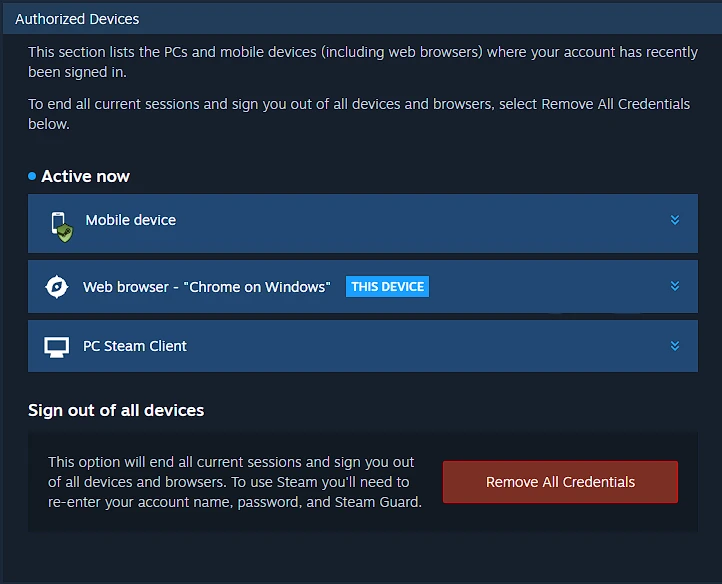
Always remember that you can check your account activity in your Steam Account Authorized Devices page.
Immediate Steps for Every Steam User
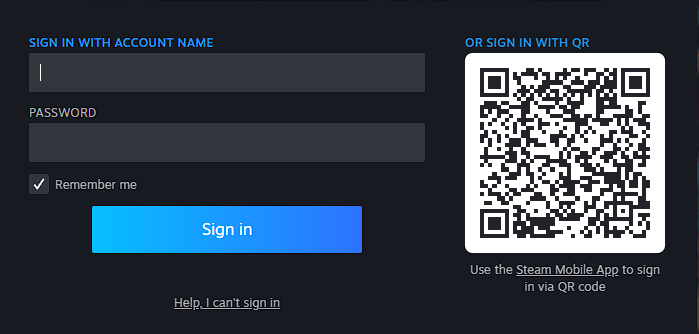
- Enable or Reinforce Steam Authenticator: If you haven’t already, install the Steam Mobile Authenticator in the Steam app. Its login codes do not depend on receiving an SMS. Phishing, stolen sessions and device compromise remain possible, so read the sign-in details before approving a QR request. We find QR sign-in convenient when it is the login we actually intended. The screenshot below illustrates the sign-in panel; use a fresh code from your own current login:
- Review and Update Passwords: Use a unique, strong password for Steam. Never reuse it elsewhere. Change it if it was reused, disclosed to a suspicious page, or there is evidence of compromise. A six-month age alone is not evidence that it has been exposed. We know a common strategy is to use a password for a set of things, like one password for Games, one for Finance, one for Work etc. This is not a secure strategy anymore.
- Check Phone-Carrier Protections: Contact your mobile provider to add a PIN or password to your account and ask which number-transfer protections it offers. A PIN can reduce risk; it does not guarantee that an unauthorized transfer is impossible.
- Beware of Phishing: Be suspicious of any unsolicited SMS or email claiming to be Steam Support, especially if they ask for codes or login details. Always verify through the official Steam website or app.
- Monitor Account Activity: In Steam’s security settings, review
Authorized Devicesto spot unfamiliar sessions. If security appears compromised, use the sign-out-everywhere option and follow Steam’s recovery recommendations. Interfaces and labels can change; the older screenshot below shows the same session-removal purpose.
In-Depth Protection Strategies
We have previously looked at what to do when your data gets breached, but we will touch on what users need to focus on now. Preparedness matters even when there is no evidence that your account was compromised. Unique credentials and secure recovery options help limit the damage if another service later exposes information; they do not require predicting when another incident will happen.
1. Password Hygiene
- Password Manager: Use a reputable password manager to generate and store complex, unique passwords for every site. We know this can be extremely tedious to try and remember a password for each and every site, so use a Password Manager. If you do not trust a password manager that stores data in the cloud, look at self-hosting something like VaultWarden. Also keep an eye on our Build your own homelab series as we will be explaining hosting it yourself soon.
- Change on Exposure: Our emphasis is on keeping important accounts protected, rather than maintaining a calendar of mandatory resets. Current NIST guidance rejects compulsory periodic password changes without evidence of compromise. If you reused an exposed password on other services, replace it everywhere it was reused with a different unique password. It would be really ironic if a leaked Epic Games password gave attackers access to your Ubisoft account because only Epic was rotated (This is just an example).
2. Strong Multifactor Authentication (MFA)
- App-Based MFA: Prefer authenticator apps (e.g., Steam Authenticator, Google Authenticator) over SMS or email. Wherever possible, use the service's main app, like Steam in this case. Important: Use MFA everywhere you can, not just on Steam. If your data gets leaked somewhere, you run risks on other services as well.
- Hardware Tokens: Where a service supports phishing-resistant security keys or passkeys, consider them for important accounts. Steam’s own supported login and recovery options must be checked separately; a hardware key is not automatically a replacement for Steam Guard.
3. Phishing and Scam Awareness
- Verify URLs: Always check that emails or SMS links point to "steamcommunity.com" or "store.steampowered.com" not look-alike domains, like st0re.steamp0wered.com.
- No Sharing of Codes: Steam Support will not ask you to send it authenticator codes. A genuine Steam web login can ask you to enter a code, so distinguish signing in to Valve’s site from handing a code to another person or an imitation page. Open the official site or app directly instead of following an unsolicited security link.
4. Account Monitoring & Recovery Planning
- Check HaveIBeenPwned: Enter your email to see if it’s part of other known leaks and follow remediation guidance. Visit haveibeenpwned.com. If you haven't already, sign up to get alerts. Sensitive breaches listed by the service require verified ownership of the email address. A clean search result is not proof that every possible leak has been checked, and an email search cannot establish that your phone number appears in this particular SMS dataset.
- Secure Recovery Options: Ensure your Steam recovery email is current and protected. Keep the Steam recovery code and supported backup codes somewhere safe and separate from the phone. Steam documents one mobile authenticator per account at a time; do not assume you can attach a second authenticator as a standby.
5. Trade Protection and API Keys
If you shared a Steam API key or suspect that a hijacker created one, review the Steam API key page through a trusted browser and revoke an unauthorized key. Do not register a new key as a supposed recovery step. A blank registration form is not evidence of a secret key, and a recognized legitimate integration should be assessed in context.
Valve’s trade-redirection guidance explains that an API key is not necessary if an attacker already controls an account or computer. Revoking a key alone is therefore not a complete recovery. Inspect the recipient and items in every trade confirmation, stop engaging with anyone pressuring you to transfer items, and secure the account and device.
Family View has been replaced by Steam Families’ parental controls. These are household access controls, rather than a general safeguard against a stolen session. Use the current family documentation for that purpose; do not rely on an old four-digit-PIN recommendation to make account hijacking impossible.
Deciding What Action Is Needed
If you have only read the SMS-leak report: review Steam Guard, recovery details and authorized devices through Steam itself. Keep the distinction between a precaution and an incident response: the May announcement did not require a password or phone-number change.
If you entered credentials on a suspicious page, approved an unexpected QR login, or see unknown sessions: treat that evidence as a separate account-security problem. Steam recommends signing out everywhere, changing the password, reviewing associated email security and checking the computer for malware. Use its account security recommendations and the official recovery site if access has been lost.
If a message threatens a ban or offers paid recovery: do not follow its instructions, transfer items or install a remote-control tool. A friend’s account can also be hijacked, so a familiar sender is not enough. Preserve relevant information for an official support request, then open the support site yourself.
Check the event date when reading a security story. An old announcement, an updated support page and a new claim may describe different circumstances. Large headline numbers deserve particular care: message records, phone numbers and unique account holders are different units. Use the confirmed data types to choose a response instead of assuming that every breach exposes passwords.
Final Thoughts: Don’t Panic, but Act
For us, the May SMS reports are a reminder to review account protection without overstating what Valve confirmed. Treat your online accounts like your house keys—protect them fiercely. Enable stronger 2FA, stay skeptical of unsolicited messages, and remember: security is a habit, not a one-time fix.
Stay safe, game on!