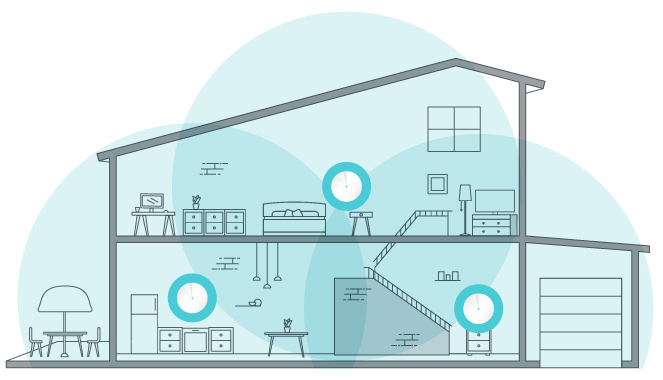
Dead zones and buffering are the enemies of a smooth internet experience. If your home Wi-Fi struggles to reach the rooms you use, two common options are a mesh system and several access points. This article's preference remains a consumer mesh system for many households, particularly where easy setup and one place to manage coverage are priorities. Understanding what “multiple hotspots” means makes the comparison more useful.
Define the Options First
Here, a hotspot means a Wi-Fi access point in the home, not a phone's mobile-data hotspot or a public network. An old router in Access Point mode, a dedicated Ethernet-connected access point and a wirelessly linked mesh satellite can all provide Wi-Fi nearby. The differences lie in their upstream connections, configuration and coordination.
A consumer mesh kit usually puts several nodes under one app. A collection of independently configured routers can require separate administration. A managed access-point platform can also provide central administration and roaming assistance. Mesh is therefore not the only way to create a coordinated network, and several access points need not mean several unrelated network names.
Size Matters, but Layout Matters More
- Large house: A mesh kit is our preferred starting point when convenient household management is the main goal. For a property with wiring, managed access points are also worth investigating. Both need adequate placement and backhaul.
- Medium house: Reusing an existing router as an access point can be economical if its supported mode, security updates and location fit the job. A kit may reduce the ongoing configuration work.
- Small house: Check whether moving a single router solves the problem before buying extra nodes. More radios do not automatically make a small network more stable.
Floor area is only a rough purchasing clue. A long corridor, concrete floors or an inconvenient internet-entry point can make a modest house difficult to cover. Conversely, an open layout may need fewer access points than the number of bedrooms suggests. Test the rooms, rather than adopting one universal node count per square metre.
Wall Warriors Need a Good Upstream Path
Brick, concrete and other obstacles can weaken the signal between any radios, including mesh nodes. Mesh does not bypass walls by name alone. A satellite sitting in the dead zone may have a good connection to the phone beside it but a poor connection to the main node.
Try a location between the working coverage and the problem area, with an open, ventilated position. Check the app's mesh or uplink status after moving it. If several walls still separate nodes, a wired link can be more useful than another expensive radio generation. If a wireless relay is unavoidable, check the actual kit's backhaul design and measure the result.
Three Ways to Extend Coverage
| Approach | Attraction | Check before choosing |
|---|---|---|
| Consumer mesh kit | Convenient setup, coordinated settings and coverage expansion. | Exact backhaul support, ports, operating modes, account requirements and updates. |
| Reused router in AP mode | Can use hardware you already have. | Supported AP instructions, remaining security support and individual management effort. |
| Managed access points | Central configuration and, on supported equipment, more detailed network controls. | Controller requirements, compatible power supply, switching and actual VLAN/roaming capabilities. |
The product and its operating mode decide the features. For example, Ubiquiti documents that its standalone AP mode lacks coordinated 802.11k/v/r roaming and requires individual configuration. That limitation should not be extrapolated to every vendor or to a centrally managed UniFi installation. Similarly, do not assume every standalone router lacks VLAN support or every managed platform offers an identical number of network names.
Setup Showdown
A consumer kit often reduces repeated configuration, which is one reason for the original recommendation. It still needs a deliberate routing choice. If an existing gateway remains the router, a supported Access Point mode can keep the coverage devices on its network. Router-mode kits have different wiring requirements and may create an additional routed network if installed behind an existing router.
For a reused router, follow that model's AP-mode instructions, including the correct uplink port. Do not simply connect two default router configurations and hope they behave as access points. Keep one intended DHCP service for a simple single-subnet network, give management interfaces reachable addresses, and record them before moving equipment.
Managed APs need a gateway too; an access point is not automatically an internet router. PoE models also need a compatible injector or switch with sufficient per-port capability and total power budget. A cable carrying data does not establish that suitable power is present. Include that equipment and the controller in the cost comparison.
Dual-Band and Backhaul Decisions
Both mesh nodes and ordinary APs may provide multiple frequency bands. In general, 2.4 GHz is useful for longer-range and older-device connections, while compatible 5 GHz clients can use wider channels under suitable conditions. Wi-Fi 6E and some Wi-Fi 7 systems additionally use 6 GHz where permitted; the client needs the corresponding capability.
A dual-band mesh commonly shares radio resources between clients and wireless backhaul. An extra radio can improve capacity, but tri-band does not universally mean a dedicated 6 GHz backhaul. Some systems reserve a band, others share or combine links, and supported modes vary. Verify the model rather than assigning every radio a fixed job in a generic comparison.
Ethernet backhaul can free wireless resources on a supported kit, but client Wi-Fi, port speeds and other links remain part of the path. It does not deliver one hundred percent of an ISP plan in every room. TP-Link's Deco instructions also require the correct Router/AP topology and explain that wired and wireless satellites can coexist.
What Assisted Roaming Can Do
The client ultimately decides when to move to another access point. Compatible 802.11k neighbour reports reduce the work of discovering candidates; 802.11v can help identify an appropriate access point; 802.11r supports faster authentication during a transition. These features can make movement smoother, but no generic handover time applies to every phone, security mode or system.
Test a real call while walking between the rooms you use. Also reconnect older printers and smart-home devices after changing optional roaming or security settings. A speed test taken while stationary does not establish that transitions are interruption-free. Central management is convenient, but it cannot force every client's roaming decisions to be ideal.
A Decision Framework for Your Home
- Identify the actual problem: poor signal, a weak inter-node link, congestion or the internet connection itself.
- Check wiring and power at potential access-point locations. A wall jack must connect to the intended network, not merely be present.
- Compare complete costs and supported features, including account requirements, updates, PoE equipment and controller maintenance.
- Try one additional coverage point and measure the same client, activity and room before buying more.
- Keep the configuration that improves normal use, and record the placement and settings for future troubleshooting.
The Verdict
For many homes, particularly those wanting an approachable coverage upgrade, a mesh system remains an appealing choice and our preference for convenience. Multiple access points can also work well when their wiring and management suit the property. The right information lets you improve the network while keeping the budget, practical layout and household devices at the centre of the decision.