If you have explored single-board computers, you will probably know the Raspberry Pi. Our Raspberry Pi and related projects section is a useful starting point. Radxa offers another interesting route for makers and developers who want a different balance of processing, storage and expansion. Its more capable boards are worth considering for demanding projects, provided the software and accessories suit the job.
Radxa's range spans several architectures and sizes. Buying a Radxa board does not automatically mean getting multi-gigabit Ethernet, an NPU or onboard Wi-Fi. Choose the exact model, revision and memory configuration rather than treating the whole brand as one interchangeable platform.
Who Is Radxa?
Radxa is a Shenzhen-based hardware company. Its own history dates its founding to 2012 and its first low-cost quad-core ROCK board to 2013. The catalogue includes ROCK and ROCK Pi boards, small ZERO boards, compute modules and x86 products. The company publishes documentation and design resources, which are valuable when a project extends beyond plugging in a keyboard and monitor.
That breadth is appealing, but it makes comparisons more demanding. A tiny sensor gateway, a desktop development board and an x86 server have different priorities. Start with the application you need to run and work backward to a supported board. A processor's specification cannot tell you whether your chosen camera, operating system or accelerator library will work together.
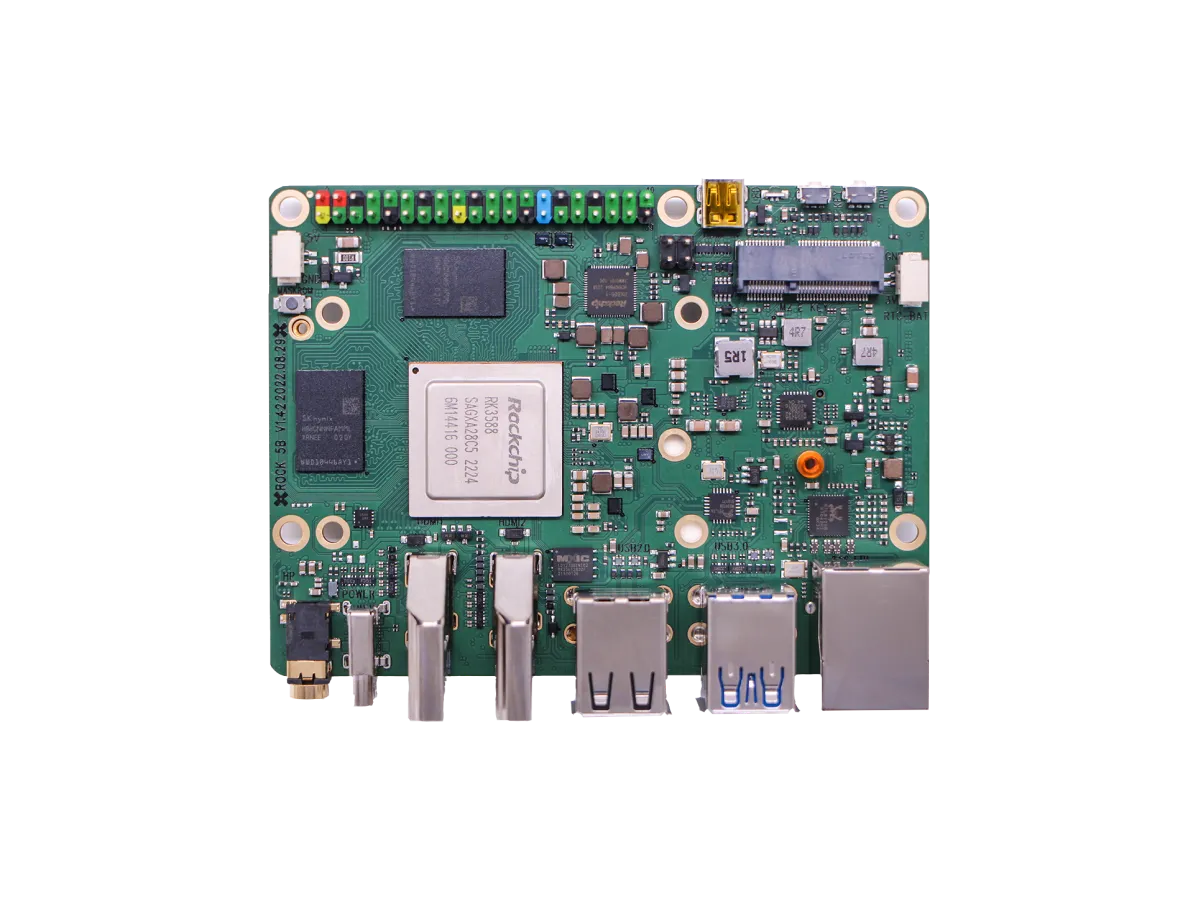
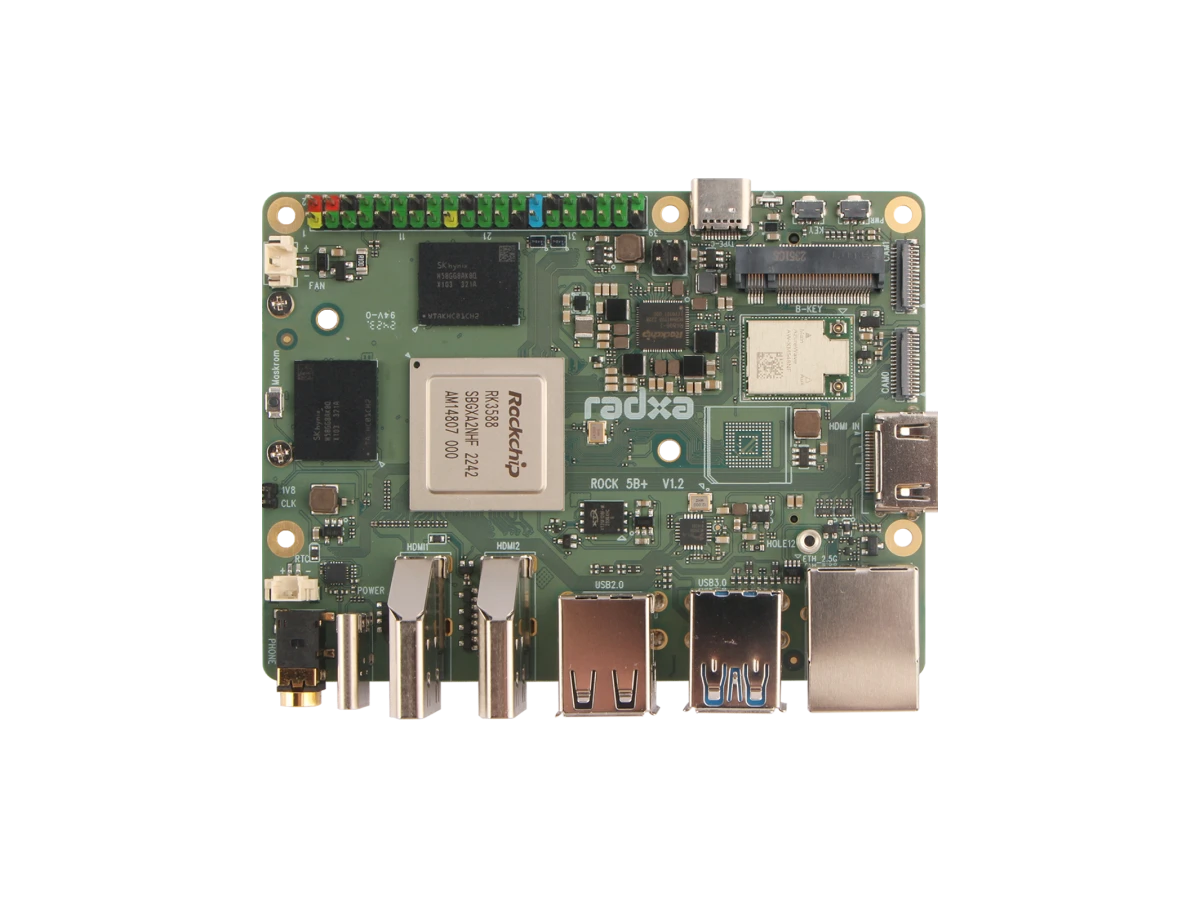
ROCK 5B and ROCK 5B+ Are Different Boards
Both use the Rockchip RK3588, with four Cortex-A76 cores up to 2.4 GHz and four Cortex-A55 cores up to 1.8 GHz, a Mali-G610 MP4 GPU and an NPU rated up to 6 TOPS. The plus model is not a different, inherently faster CPU. Its memory and interfaces are the useful distinctions.
| Feature | ROCK 5B | ROCK 5B+ |
|---|---|---|
| Listed RAM | 4/8/16 GB LPDDR4X | 4/8/16/32 GB LPDDR5 |
| NVMe connection | One PCIe 3.0 x4 M-Key slot | Two PCIe 3.0 x2 M-Key slots |
| Wireless | No onboard Wi-Fi; optional module | Onboard Realtek 8852BE Wi-Fi |
| Ethernet | 2.5 Gigabit | 2.5 Gigabit |
These are the configurations listed in Radxa's current documentation. Check the actual sales SKU and board revision. Neither M-Key storage arrangement supports M.2 SATA drives. The retained photos show the original ROCK 5B and a ROCK 5B+ V1.2; the model marking in the second image helps identify the difference.
Storage, Networking and Expansion
NVMe is an attractive option for applications that repeatedly read and write data. It can avoid relying on a microSD card for a database or build directory. However, a PCIe interface specification is a transport limit, not a measured SSD result. Performance also depends on the drive, filesystem, workload, cooling and operating system. A sequential benchmark says little about how quickly a small database transaction completes.
A 2.5 Gigabit Ethernet port can be useful for local storage, but the switch, other computer and storage path must keep up. If a NAS serves a laptop over congested wireless, the board's Ethernet rate may not be the limiting factor. Plan the entire route before paying for a faster interface.
For GPIO projects, a familiar-looking header is not sufficient proof of accessory compatibility. Check pin assignments, electrical requirements and software support for the exact board. A case must also leave space for the chosen storage device, cooling and connectors. Do this before ordering a bundle based on a photograph of a similar model.
Software Support Matters as Much as Hardware
The official ROCK 5B download page distinguishes Debian images for the 5B and 5B+, along with Android and third-party systems. Kernel versions and images are model-specific. A Debian desktop image with a vendor kernel is not evidence that every feature works on an arbitrary mainline distribution. Community images also have their own release status and support scope.
Read the image's release notes and known issues before installation. For a headless server, verify networking, storage, updates and recovery first. For a media centre, test the exact codecs and playback application you intend to use. Hardware video capability does not guarantee that every browser, player or streaming service exposes that acceleration.
ARM boards need applications and container images built for the appropriate architecture. An x86-only binary does not become native just because the board runs Linux. If your essential software requires x86, choosing an x86 board may avoid an unsupported emulation layer. Keep an initial working image and a separate backup of application data so recovery does not depend on reconstructing every setting from memory.
AI, Media and Home-Server Projects
The ROCK 5B remains an appealing platform for development, local services and experiments with AI. Its NPU rating describes potential accelerator operations under specified conditions; it does not establish model accuracy, camera count or end-to-end response time. Models must be compatible with the runtime, and the surrounding application still has work to do.
Frigate documents a community-supported Rockchip RKNN detector and lists the RK3588 among compatible SoCs. Its documentation requires the relevant Rockchip installation setup and supported models. Object detection, video decoding, recording and motion processing are different tasks. Do not infer dozens of cameras or near-zero CPU use from the NPU's TOPS figure; begin with a modest workload and measure resource use.
For a home server, list the services that must remain available and the data that matters. Keep backups outside the board and test restoration. Consider what happens during a power interruption or failed storage device. A compact computer can run useful services, but size and low advertised processor power do not provide automatic redundancy or a fixed whole-system electricity bill.
ZERO and X86 Options
The ZERO 3W and 3E use an RK3566 in a 65 × 30 mm format. They differ in network and storage options: the current documentation lists wireless on the 3W and Gigabit Ethernet on the 3E. These small boards suit space-sensitive projects, but choose the variant around the connection you need. Check wireless revisions and included storage rather than assuming all listings are identical.
The Radxa X4 provides another direction with an Intel N100 and an RP2040 coprocessor for peripheral control. Radxa lists the N100 as four cores and four threads, so four N100 boards provide sixteen CPU cores, not thirty-two. Its 2.5 Gigabit Ethernet can support PoE with an additional compatible HAT; a network cable alone does not supply power without the required hardware.
A cluster can be a worthwhile learning project, but it adds switches, storage, power supplies and maintenance. Applications need to distribute work across nodes; they do not automatically see one large shared-memory computer. Compare the full assembled cost with a small PC before deciding that several bare boards are the economical option.
Choosing a Radxa Board
My buying perspective is that Radxa's performance and flexibility make it a compelling alternative for more ambitious SBC projects. That does not mean it is the easiest choice for every beginner. Familiar tutorials, accessory support and a well-understood recovery process can matter more than a higher specification.
Budget for the power supply, cooling, storage, wireless module where needed and a suitable enclosure. Check local support and replacement availability. Choose a board with documented support for your main task, then leave room for expansion. Consult the official Radxa website and the model-specific documentation before purchase; this overview is a guide to those decisions, not a hands-on benchmark.