Setting up a personal DNS server is a useful way to manage your home network, but a record such as proxmox.local can behave differently across clients. The central distinction is between ordinary DNS, multicast DNS (mDNS) and Link-Local Multicast Name Resolution (LLMNR). A .local conflict primarily concerns mDNS; disabling LLMNR is not a universal fix.
If you are following our Building Your Own Homelab series, this helps explain why an internal record can answer a direct DNS query yet fail in an application. We can diagnose which resolver is involved and choose a suitable namespace without assuming that the DNS server itself is broken.
What Is LLMNR?
LLMNR allows hosts on a local link to answer name-resolution queries without a conventional DNS server providing the answer. RFC 4795 defines its DNS-like message format, operation and security considerations. It is often encountered as a fallback for short names on Windows networks, but the protocol is not defined as exclusively single-label resolution.
DNS and DHCP play different roles. DHCP can distribute DNS server and search-domain settings; the DNS server answers names in the zones it serves or resolves. LLMNR uses local-link communication rather than those centrally maintained records. Resolver selection and fallback vary by operating system, application and policy, so do not assume one fixed DNS–LLMNR–NetBIOS sequence everywhere.
Is LLMNR Still Needed?
On a network with dependable DNS records and correctly configured clients, LLMNR may be unnecessary. Some peer-to-peer or older application workflows still depend on it. Test actual dependencies before switching it off, particularly if users access services through short names rather than fully qualified names.
LLMNR responses are also a trust issue. A local attacker may provide a misleading answer and redirect a client towards an attacker-controlled service. CISA's countermeasure guidance recommends evaluating dependencies and using controlled changes. Disabling the protocol reduces this particular opportunity; it does not secure every other name-resolution or authentication mechanism.
Why .local Can Behave Differently
RFC 6762 gives names ending in .local. special, link-local mDNS treatment. It requires queries for these names to be sent to the mDNS multicast addresses. It also explicitly permits implementations to query other mechanisms in parallel, including unicast DNS. Therefore, “a .local request will never reach your DNS server” is too absolute.
The practical problem is ambiguity. A unicast DNS zone and an mDNS responder can offer different answers for the same name, and client behaviour can differ. A direct query to your configured DNS server may succeed because it explicitly selects unicast DNS, while a browser or operating-system resolver follows another path. A timeout can also reflect missing multicast responses rather than a missing record on your server.
mDNS and LLMNR Are Separate Protocols
| Protocol | Port and multicast addresses | What matters here |
|---|---|---|
| mDNS, RFC 6762 | UDP 5353; IPv4 224.0.0.251; IPv6 ff02::fb | Special treatment of .local; commonly used by local discovery software. |
| LLMNR, RFC 4795 | Port 5355; IPv4 224.0.0.252; IPv6 ff02::1:3 | Separate local-link resolution. Multicast queries normally use UDP; the specification also defines unicast TCP operation. |
Bonjour and Avahi are familiar implementations associated with mDNS and service discovery. Windows LLMNR policy does not automatically disable them or every Windows mDNS implementation. Treat a discovered printer, a DNS hostname and an authenticated file share as separate things to verify.
Diagnose the Actual Failure
- Check the DNS record directly against your intended server, including both IPv4 and IPv6 records where applicable. Confirm that it returns the address of the service you actually intend to reach.
- Check which resolver the affected client uses. A VPN, browser secure-DNS setting, secondary resolver or another active network interface can change the path.
- Compare the fully qualified name with any short-name form. A missing search suffix is a different problem from mDNS handling of
.local. - Compare clients and applications. Record whether the failure is name resolution, connection refusal, timeout or a certificate error; those require different fixes.
- If needed, observe query traffic or the DNS server's query log. Seeing port 5353 or 5355 identifies a protocol, while the absence of a server log entry alone does not explain which alternative the application selected.
Keep the test small: one client, one known service and one change at a time. If the service responds at its correct address but the hostname fails, concentrate on resolution. If resolution succeeds but the connection fails, investigate the listening service, firewall and application rather than repeatedly changing DNS records.
Choose a Suitable Internal Namespace
home.arpa: RFC 8375 designates this namespace for residential networks, for examplenas.home.arpa. Its records are meaningful within the home network, not a globally unique public identity.internal: ICANN's July 2024 resolution permanently reserves this top-level string from delegation in the public DNS root for private use. You still need to configure the internal DNS zone and clients.- A subdomain of a domain you own: An internal zone such as
labunder your registered domain can support a consistent naming scheme. Plan which answers are private and which records, if any, must be public.
Do not treat .home and .lan as equivalent standards-based reservations. RFC 8375 specifically replaces earlier residential use of .home with home.arpa. Choosing a better suffix removes the particular .local conflict, but it does not automatically repair incorrect client DNS settings.
For a domain you control, Let's Encrypt DNS-01 validation can issue certificates, including wildcards, by checking public DNS TXT challenge records. The service itself need not be exposed publicly for that validation method. Automate renewal carefully and restrict DNS API credentials. A private-use suffix does not become publicly certifiable merely because you create a local DNS record.
Disabling LLMNR Deliberately
Use this as a network-hardening decision after confirming your DNS plan, rather than as the first response to any .local failure. Microsoft's DNS Client policy documentation maps “Turn off multicast name resolution” to the EnableMulticast policy value and states that enabling the policy disables LLMNR on the adapters.
Check Dependencies First
Inventory important file shares, management pages and application names. Ensure they resolve through supported DNS, including on the networks where they are used. If a workflow depended on LLMNR, removing it can expose that missing configuration. Record the old policy state so you can reverse an unintended interruption.
Steps to Disable LLMNR on Windows
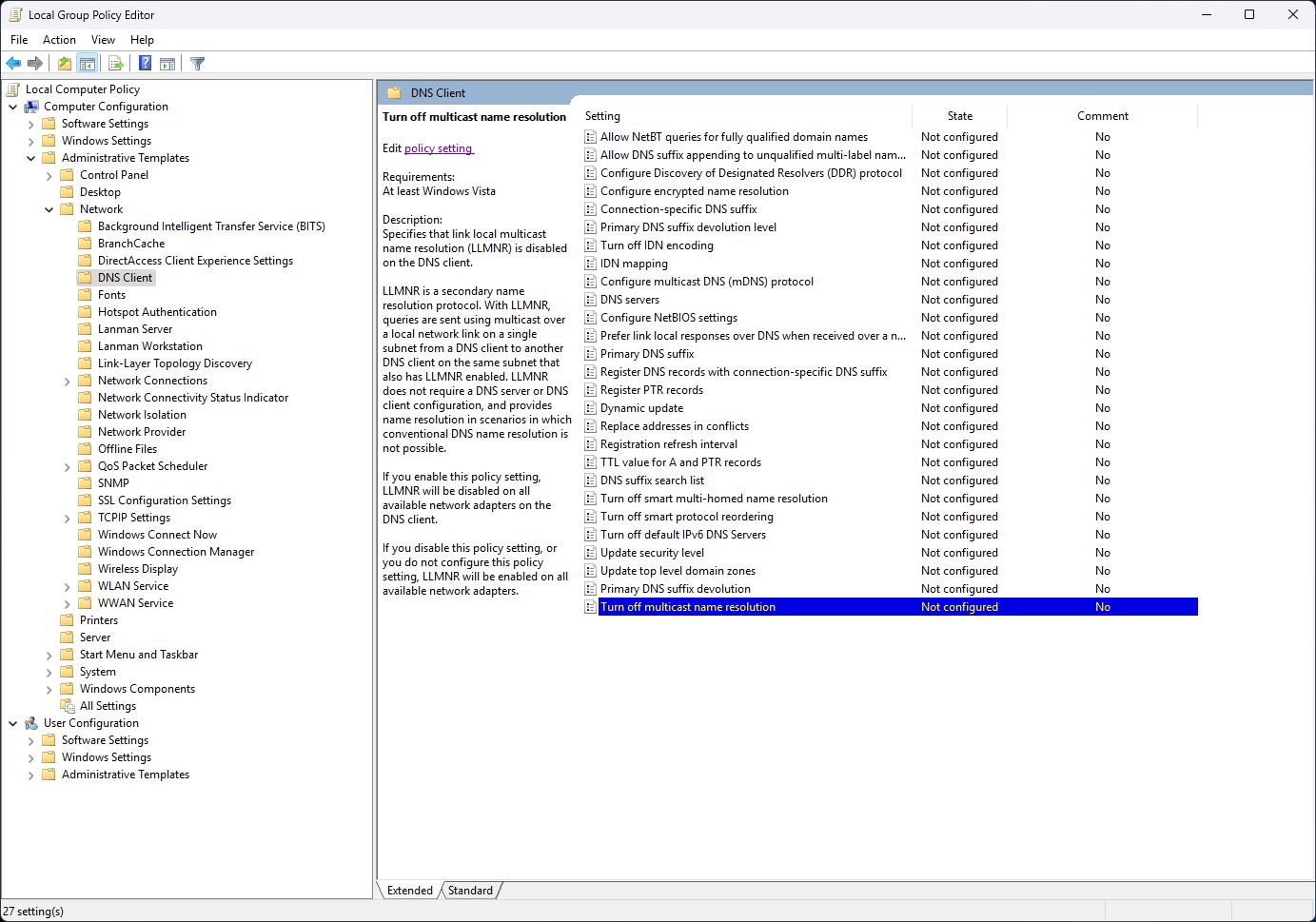
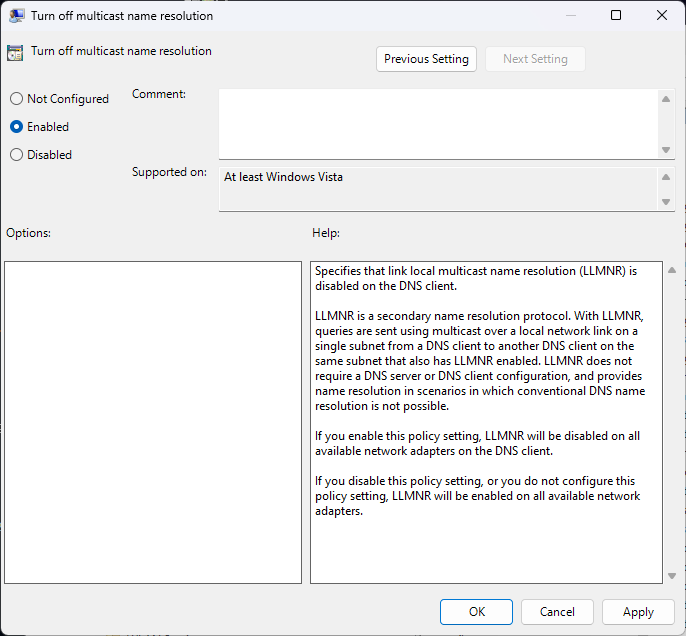
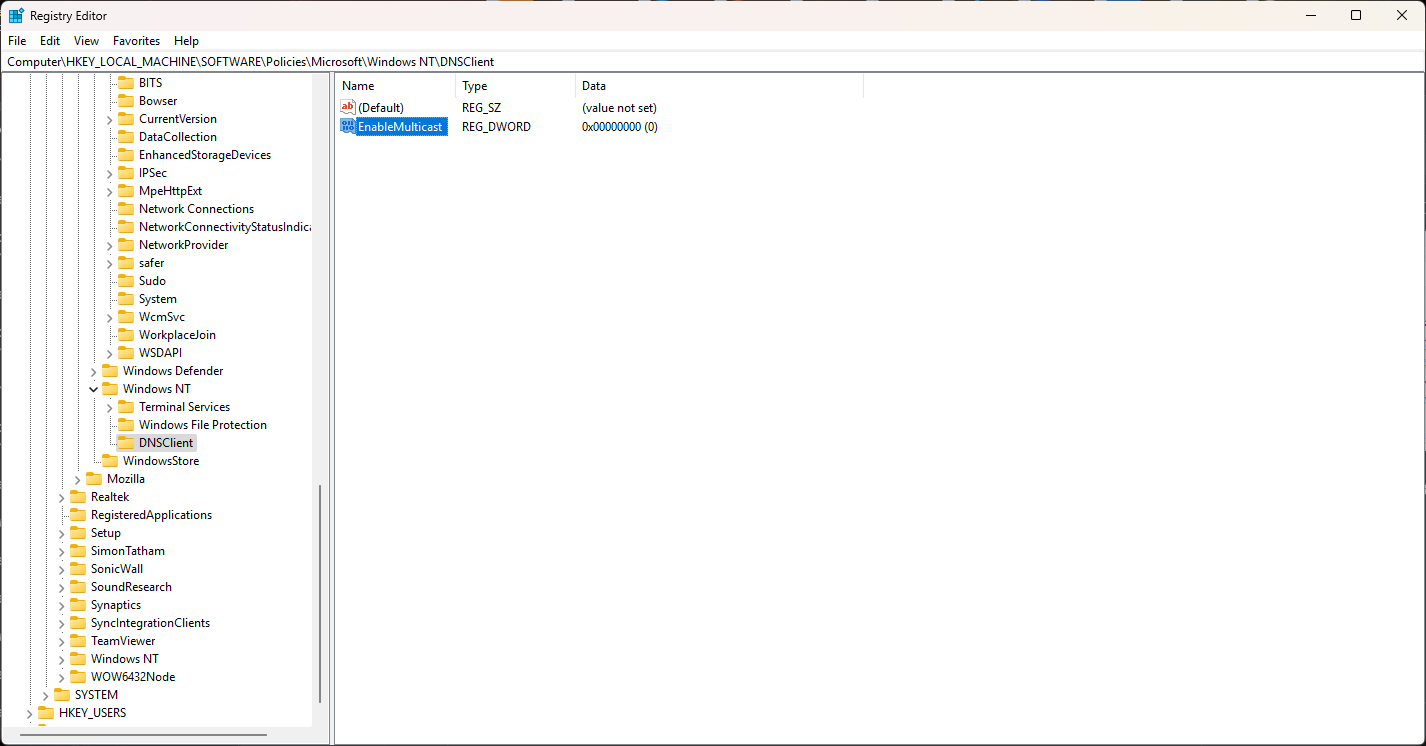
The screenshots below show the Windows policy and registry key used to disable LLMNR. They do not show an mDNS switch. Back up the relevant registry key before editing it, and use an administrator account for machine policy changes.
Method 1: Using Group Policy (Windows Pro and Enterprise)
- Open the Group Policy Editor (
gpedit.mscin the Run dialog). - Navigate to:
Computer Configuration -> Administrative Templates -> Network -> DNS Client - Find Turn Off Multicast Name Resolution and double-click it.
- Select Enabled and click OK.
- Restart the computer for changes to take effect.
Method 2: Inspecting the Registry Policy Key
Microsoft documents this policy for supported Pro, Enterprise, Education and IoT Enterprise editions. Windows Home lacks the normal Local Group Policy Editor, and these screenshots do not establish policy support on every Home build. For a managed PC, use the administrator-approved policy method rather than assume a registry edit overrides management.
- Open Registry Editor (
regeditin the Run dialog). - Navigate to:
HKEY_LOCAL_MACHINE\SOFTWARE\Policies\Microsoft\Windows NT\DNSClient(if DNS client is not in the list, it will need to be added) - If
EnableMulticastdoes not exist, create a new DWORD (32-bit) Value and name itEnableMulticast. - Set the value to
0(zero) to disable LLMNR. - Restart the computer for changes to take effect.
Verify the Change
After policy application and the indicated restart, check the effective setting and test a deliberately unresolved name in a controlled environment. Where verification matters, inspect whether the client emits LLMNR traffic on port 5355. Also retest the real DNS names users require. A registry value appearing in a screenshot is not, on its own, proof of effective behaviour on another edition or managed device.
Understand the Remaining Security Scope
A poisoned name-resolution answer can send an application towards an unintended service. The subsequent credential exposure depends on the application, authentication method and policy; it is not an automatic transfer of the user's stored password hash after every typo. Disabling LLMNR does not remove legacy NetBIOS resolution, mDNS or malicious DNS answers. Maintain appropriate authentication and network controls alongside the resolver change.
Conclusion
For an internal DNS zone, avoid mixing .local with its special mDNS role. Choose an appropriate namespace, verify client resolution and keep LLMNR hardening separate from mDNS troubleshooting. The Windows steps shown here address LLMNR; the naming and resolver checks explain why they may not solve a particular .local problem.